


Finding this page means one of two things: You’re a first-time ERP software buyer looking for a new solution with all the best functionality, or you need new ERP functions for your current system to streamline workflows. Either way, you’ve come to the right article.
Pinpointing the suitable modules takes brainstorming and determining vital department tools to satisfy operations. This article covers the top-rated core functions of ERP, industry-specific ERP, purchasing considerations, selection processes and more.
Compare Top ERP Software Leaders

Core ERP Functionality
This list, though not exhaustive, is a great starting place when deciding what ERP functions you should consider:
- Inventory Management: Inventory management is vital in our ERP software requirements list. Inventory management solutions give users more stock control and visibility. Inventory management exchanges data with manufacturing, distribution, sales, and customer records, making it a vital function of ERP. This data sharing gives greater supply chain visibility and helps users predict issues.
- Accounting/Financial Management: Accounting tools support accounts receivable and payable and general ledger functions to manage finances. Accounting ERP functions also support payroll, time tracking and tax management. These bookkeeping tools reduce the time accounting staff spends collecting financial information, diminish erroneous and redundant entries, and provide your team with a comprehensive look at your finances.
- Customer Relationship Management (CRM): CRM functionality helps companies track campaigns, nurture leads and maintain client information. While standalone solutions perform these tasks, an integrated CRM can transform your business. As part of an ERP solution, a CRM provides complete customer data in one place. This program offers customer data access for swift shipping, billing or marketing purposes.
- Supply Chain Management: Exemplary SCM software can reduce expenses, forecast and supervise demand, diminish mistakes, perform automatic finances, and streamline product allocation. Some SCM accessories include bidding and spending, supplier management, compliance, shipping statuses and more.
- Human Resources: Human resources is another back-office software type modern ERPs facilitate. ERP software covers all HR functions an employee experiences with your company. Applicant tracking, one of many functions of ERP, keeps tabs on prospective employees during job recruitment. It enables your HR staff to search for the best candidates according to your team’s criteria.
- Business Intelligence (BI): BI tools can help you visualize data in easy-to-read charts and graphs to make better business choices. Embedded analytics software can weave into the background of your workflows while reducing platform switching. You can gather financial, order and other vital data for speedier decision-making.
- Compliance and Risk Management: It’s not easy maintaining compliance with industry and national standards, such as Sarbanes-Oxley, International Organization for Standardization (ISO), FDA and more. Risk management offers AI, machine learning, blockchain and other tools to track system insufficiencies. You gain complete IT, web application, endpoint security and cloud infrastructure transparency in one centralized module.
- Technology Integration: Merge your ERP software with AI, IoT, blockchain and other technological trends for optimal results.
Compare Top ERP Software Leaders

An example of CRM software.
Although this list specifies core functions, aka multifunctional ERP, other ERP modules streamline workflows across vast company departments.
Simon Niklaus, editor-in-chief of Kredite Schweiz, spoke to us about the effectiveness of project management and order processing tools.

Project management is crucial, as many businesses need to track the progress and costs of their projects, and ERP systems often include tools to facilitate this. Similarly, order processing is a key part of many businesses, and ERP systems can streamline this process by automating order entry, tracking and fulfillment.
Simon Niklaus
Editor-in-Chief, Kredite Schweiz
Kelly Indah, security analyst and tech expert at Increditools, spoke to SelectHub about other ERP functions that aren’t part of the core list but are equally important.

Additional ERP capabilities like production planning, project management and sustainability are important for some organizations, but not universally considered ‘core’ functions. However, the flexibility of modern ERP allows organizations to enable the functions that are most impactful for their industry and use case.
Kelly Indah
Security Analyst and Tech Expert, Increditools
Integrating core ERP functions with other systems can give you a consolidated view of operations to catch bottlenecks and enhance efficiency. Indah discussed a few ways you can merge your solutions.
APIs and microservices to standardize system interoperability. This simplifies connecting to existing software tools. Pre-built connectors, adapters and drivers to enable out-of-the-box integration with common apps. For example, CRM, payroll [and] eCommerce. Cloud-based deployment so everyone connects through one cloud ERP platform rather than on-premise solutions. This provides one source of truth.
Kelly Indah
Security Analyst and Tech Expert, Increditools
Compare Top ERP Software Leaders
Industry-Specific ERP and Their Functions
Did you know that there are ERP solutions that serve specific industries, like manufacturing, small businesses, healthcare and more? Here’s a brief rundown of different ERP industries and their functions:
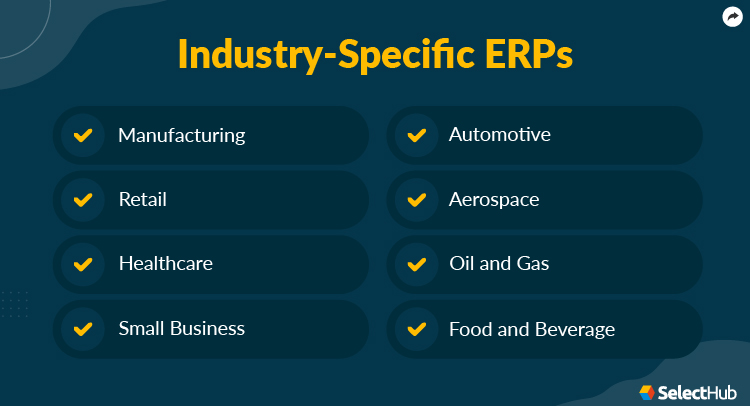
- Manufacturing: Manufacturing systems allow you to focus on production workflows and ensure prompt, fulfilled products while increasing productivity. Some features include quality management, PLM, CAD/CAM management, mobility and more.
- Retail: Retail ERP allows you to create your store or business for online and physical landscapes. You can also manage social media channels, allowing consumers to buy products from mobile devices.
- Healthcare: Healthcare ERP offers industry-related tools, such as patient management, predictive analytics and inventory management. You can also access HR, accounting and back-office tools to streamline back-office workflows.
- Small Business: Whether a freelancer or startup, small business ERP offers the right functionality to fit your budget. Project management, HR, inventory and warehouse management are just a few noteworthy functions of small business ERP.
- Automotive: Automotive ERPs serve numerous automotive sectors, like tiered suppliers, aftermarket and Original Equipment Manufacturers (OEMs) to create new cars or fix up older models.
- Aerospace: Manage all aviation and defense manufacturing needs with this solution. Work with procurement, analytics, warehouse management, finance, service management and other capabilities.
- Oil and Gas: Perform upstream and downstream operations, mining, extracting, supervising, maintaining compliances, and more in the oil and gas sector. Supply chain management, procurement and quality management are other critical functions of ERP.
- Food and Beverage: Supervise food and beverage manufacturing for sodas, alcohol, packaged foods and more in one centralized system. Recipe and formula management, compliance, allergen management, and quality control are vital functions of this system.
Who Wins: Multifunction or Industry-Specific ERP?
Who’s the real winner in this multifunction and industry-specific ERP debate? Each system has its pros and cons.
Derek Bruce, HR and Operations Director for First Aid at Work Course with 25 years of operational management and ERP knowledge, spoke to SelectHub about how multifunction ERP can improve growth trajectory.

ERPs with multiple functions can seamlessly integrate all your disparate systems into one comprehensive platform [For example], managing accounts, tracking inventories and handling human resource operations. This centralization significantly enhances operational visibility. It reduces data redundancy and optimizes business processes.
Derek Bruce
HR and Operations Director, First Aid at Work Course
Niklaus explained how multifunction ERP can adapt to ever-changing business needs.
[multifunction ERPs] offer a range of functions that can be tailored to suit business processes, making them a flexible tool that can evolve with the business. This adaptability can lead to improved efficiency and productivity, ultimately contributing to business growth.
Simon Niklaus
Editor-in-Chief, Kredite Schweiz
Indah touched on the importance of multifunction ERP interlocking departments for improved communication and real-time results.
The main advantage of comprehensive ERP functions is the ability to tightly integrate diverse business operations into interconnected digital systems that communicate in real time, eliminating data siloes, automating workflows, providing organizations-wide visibility and enabling data-driven, adaptive decision-making.
Kelly Indah
Security Analyst and Tech Expert, Increditools
Having a solid software selection plan is essential. Niklaus conveyed that you’ll gain great rewards if you play your cards right and get multifunction ERP software that meets your business needs.
If the system’s capabilities align well with the business’s needs and processes, it can lead to significant improvements in efficiency and productivity, which can translate into a high ROI. However, if the system’s functions don’t match the business’s needs, it may not deliver the expected return. Therefore, I believe it’s crucial to thoroughly assess a system’s functions before investing in it.
Simon Niklaus
Editor-in-Chief, Kredite Schweiz
Bruce touched on the inconveniences of a multifunction ERP, from cost to implementation challenges.
[Disadvantages] include its high cost, often prohibitive for smaller businesses, rigid and inflexible system structures, which may not accommodate evolving business needs appropriately. Businesses may require modification of their current processes for seamless integration with the new system. Moreover, the implementation process could demand considerable time and resources.
Derek Bruce
HR and Operations Director, First Aid at Work Course
Bruce also mentioned that although a multifunctional ERP covers generic functionality, the solution may lack in-depth workflows.
Unique operational needs to specific business sectors may not find these generic solutions fully adequate for their distinct challenges. This inadequacy could potentially result in inefficiencies and mismatched processes, an unwanted compromise on effectiveness and efficiency.
Derek Bruce
HR and Operations Director, First Aid at Work Course
Industry-specific ERP systems offer tools that cater to specific sectors. Automotive manufacturers need different tools from those in the retail and eCommerce realms.
Compare Top ERP Software Leaders
Niklaus said companies should consider their business size and nature when deciding between industry-specific and multifunctional ERP.
I believe that small businesses with specific needs might benefit more from industry-specific ERP software, as these systems are tailored to address the unique challenges of a particular industry. On the other hand, large corporations with diverse operations might find more value in multifunction ERP systems, as these systems offer a broader range of capabilities that can cater to different aspects of the business.
Simon Niklaus
Editor-in-Chief, Kredite Schweiz
Bruce touched on how industry-specific ERP solutions offer more customization tools to meet operational objectives.
[Industry-specific ERPs] are tailored specifically to meet the unique requirements of each industry, thus enabling a high degree of process personalization. It focuses intently on the unique pain points of the industry, providing precise solutions for distinct challenges.
Derek Bruce
HR and Operations Director, First Aid at Work Course
Bruce also mentioned some cons of investing in industry-specific ERP.
Despite offering tailored functionality, the system might not adjust easily to rising volumes or evolving operational requirements as the business grows. Integrating an industry-specific ERP with other systems often poses challenges to businesses. These programs, designed with a narrow focus, might limit compatibility with external software, potentially catalyzing inefficiencies in process management.
Derek Bruce
HR and Operations Director, First Aid at Work Course
Indah said another route is investing in a modern multifunction ERP with industry-specific needs.
While industry-built ERP can align well out-of-the-box, configurable solutions allow adapting organically as strategic priorities shift, without the burden of switching systems. The flexibility, agility and longevity of customizable multifunction ERP trumps any incremental benefit of industry specialization.
Kelly Indah
Security Analyst and Tech Expert, Increditools
Thanks to the in-depth breakdown from our SMEs on the multifunction vs. industry-specific ERP battle, we’ll rule this argument as a draw.
Purchasing Considerations
There are several considerations to mull over when browsing for new software and ERP requirements, from company size and deployment options to industries.
Niklaus gave some rough expense estimates, including implementation and training for systems with core ERP functionality like inventory management, accounting, HR and more.
For small and medium-sized businesses with basic to moderate ERP system requirements, I think the overall cost of implementation can range between $175,000 and $850,000. For large companies with higher-level customization requirements, I know that ERP implementation can cost anywhere from $1 million to $10 million. It’s always a good idea to get a customized quote based on your specific business requirements for a more accurate estimate.
Simon Niklaus
Editor-in-Chief, Kredite Schweiz
Indah took a stab at giving a price range for mid-sized company implementation costs for an ERP with all core functions.
I would estimate an approximate range of $500,000 to $5 million in upfront implementation costs, followed by ongoing annual fees around 20% of the initial cost for maintenance, upgrades and support.
Kelly Indah
Security Analyst and Tech Expert, Increditools
Let’s review some pricing considerations:
- Company Size: Most ERP solutions are scalable and accommodate your ever-growing employees, departments and machinery.
- Deployment Option: Cloud, on-premise and hybrid deployment options have unique pros and cons. Find the option that best meets your company’s demands.
- Industry Needs: Do you serve one industry or several? Find ERP functions that encompass all of your sector or department needs.
- New Software or Add-On Functionality: Is your entire solution obsolete, or do you lack additional capabilities? Save money and find a vendor to integrate their modules with your current system.
Compare Top ERP Software Leaders
How To Choose the Right Modules and Software
Navigating the ERP selection process as a first-time buyer can be overwhelming. Indah said first-time buyers should do their homework and have a solid plan.
Clearly define your business objectives and processes upfront to shape ERP requirements accordingly. Robustly vet vendor capabilities and cloud infrastructure beyond basic functionality. Model total cost of ownership over a five-10-year timeframe. Extensively test integrations and data migrations before going live. Budget for change management and training to drive user adoption.
Kelly Indah
Security Analyst and Tech Expert, Increditools
Niklaus stressed the importance of using free trials or demos.
[Free trials or demos allow] you to test the software’s functionality and see if it fits your business needs before making a commitment.”
Indah also mentioned that buyers should plan for the future with ever-changing technologies.
Carefully assess the vendor’s commitment to continuous innovation through R&D investments and partnerships that expand capabilities. The pace of technical advancement is accelerating, so your chosen platform must evolve quickly with emerging technologies like AI, advanced analytics and process automation. This future proofing through vendor innovation pipeline will ensure long-term ERP relevance and value.
Simon Niklaus
Editor-in-Chief, Kredite Schweiz

For people needing to update their current solution, Nikalus said increasing internal collaboration and understanding existing workflows are must-haves.
I think it’s important to assess the performance of the existing system and identify areas for improvement. Additionally, involving end-users in the decision-making process can provide valuable insights and help ensure the new system meets their needs.
Simon Niklaus
Editor-in-Chief, Kredite Schweiz
Bruce recommended evaluating your industry operation intricacies when choosing ERP systems.
Some businesses flourish utilizing multifunctional ERP software. Others, however, necessitate the specialized functions uniquely offered by an industry-specific ERP. Demonstrating this divergence underscores just how critical understanding operational complexity is.
Derek Bruce
HR and Operations Director, First Aid at Work Course
SelectHub’s easy-to-follow methodology called Lean Selection helps you find the right solution and ERP functionality in nine simple steps:
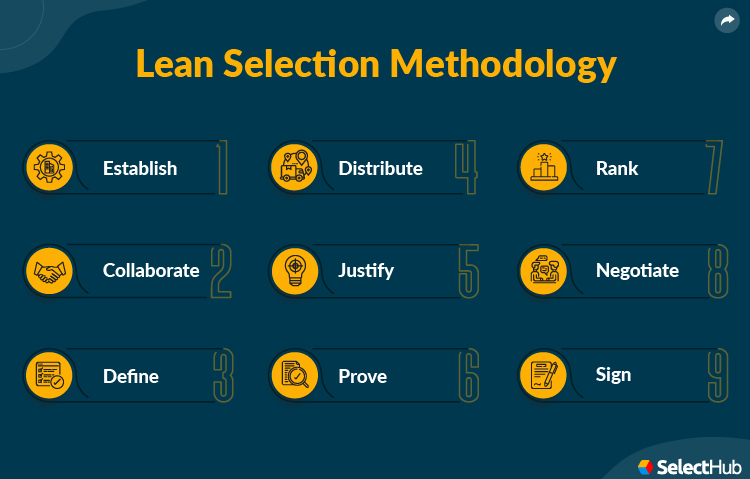
- Establish: Evaluate why you need a new system.
- Collaborate: Generate a selection committee for requirements gathering.
- Define: Draft a thorough functionality and requirements list.
- Distribute: Review how well potential vendors score with your requirements list.
- Justify: Consider whether you need a new system, need integrations or add-ons, or want to keep your current solution and end the selection process.
- Prove: Allow your top vendors to show demos, proofs-of-concept (POCs) and use cases for the solution to see how well it executes your desired functions.
- Rank: Compare each vendor’s requirement and demo scores for better ranking.
- Negotiate: Review a vendor’s contract and consider signing with them. If the agreement and terms seem sketchy, get a lawyer or law firm for review. Review your other choices until you both obtain agreeable conditions.
- Sign: Reach a compromise, sign with your ideal vendor and pay the total cost of ownership (TCO).
Compare Top ERP Software Leaders
ERP Examples
Numerous companies have invested in and had successful ERP implementations to boost efficiency and gain a high ROI. Mondelēz International and Molex are just a few real-world examples.
Mondelēz International Inc. Moved SAP Products To Cloud
Mondelez International Inc. is a centralized hub of organizations, from Oreo and Cadbury to Halls, Belvita and more.
According to their case study, Mondelez used SAP MaxAttention to move numerous SAP products to Microsoft Azure for better scalability and production speeds.
Migrating data from nine different SAP products to the cloud garnered favorable results, such as:
- Boosting high-volume core system transaction performance by 50%.
- Enhancing data security.
- Digital transformation acceleration for the future.
Molex Implemented Infor Nexus
Molex is an electronic plug and socket manufacturer that launched in the 1930s. It specializes in antennas, building infrastructure, cable assemblies, RF filters, and more.
According to their case study, Molex adopted Infor Nexus to boost responsiveness across worldwide logistics interruptions. Some Infor Nexus functionality includes financial supply chain management, pack and ship, factory management and mobile service.
Some positive outcomes from adopting this ERP system were:
- Improved KPI tracking for strengthened in-transit visibility, performance understanding and decision-making.
- Abolished Excel spreadsheets.
- Garnered access to the Infor Control Center for drilled-down data transparency in a consolidated screen.
Compare Top ERP Software Leaders
FAQs
ERP modules are tools an ERP uses for specific company departments or workflows with related capabilities. For example, an accounting module would have functionality like general ledgers, accounts payable and receivable, bank reconciliation, and more.
As aforementioned, it’s essential to choose the system and functions of ERP that best meet your company’s needs.
These functions vary depending on company needs and departments. However, the most common modules are:
- CRM
- HR management
- Inventory management
- Accounting/Financial management
- And more
There are numerous ERP types, including:
- Cloud
- On-premise
- Food and beverage
- Automotive
- Industrial
- Small business
- Aerospace
- And more
ERP functions allow you to perform specific tasks, such as balancing general ledgers, managing customer feedback, manufacturing products and more. The proper functions can meet your needs and streamline tasks that otherwise would take forever.
Meet with your department leaders to brainstorm a list of vital functions. This assembly will help you decide needs from wants and what’s best for specific production practices. More heads are better than one.
Compare Top ERP Software Leaders
Next Steps
Finding the proper ERP functions is no picnic. However, we hope this article helped you gain perspective on your search and the best modules to choose for your company’s practices and objectives.
Our free requirements template for ERP lets you prioritize which software modules and functions you care about so you can easily find the best-matching products.
What ERP functions are most important to you? Let us know in the comments.


Conversation (5)
Levi Armstrong - September 15, 2020
It’s great that you mentioned that one of the beneficial functions of ERPs is inventory management, which helps business manage their goods or supplies and forecast demand. Dad and I are thinking of starting a hardware store downtown since my godfather is renting a commercial space. If we proceed with our plan, I’ll definitely discuss getting ERP software with my dad. Thanks!
Madeline Reinbolt - October 12, 2020
Thanks for sharing, Levi!
MiniBigTech - July 24, 2019
Industry This type can be tailored to suit the needs of Industry such Retail, Automotive. Web-Based: This type, also referred to as cloud-based, is hosted by a vendor or open source business remote access from anywhere or any device. Small Business: This type is particularly attractive to smaller businesses to help with order management and human resources management. Check it out click on ERP software modules. Please contact us at any time.
MiniBigTech - March 13, 2019
Excellent blog. It is very informative for entrepreneur who is trying to relaunch it business they should see this ERP Software Modules seeing that it will be fruitful.
Kim O’Shaughnessy - March 13, 2019
Thanks for reading! We’re glad you found the article informative.