---
title: The 5 Best Business Password Managers for 2026
---
# The 5 Best Business Password Managers for 2026
Last Reviewed: March 9, 2026 9 min read [No comments](https://www.selecthub.com/research/enterprise-password-management-software/#respond)
[](https://www.selecthub.com/author/tamoghna-das/) [Written by Tamoghna Das](https://www.selecthub.com/author/tamoghna-das/)
Technical Content Writer
[](https://www.selecthub.com/author/pooja-verma/) [Edited by Pooja Verma](https://www.selecthub.com/author/pooja-verma/)
Content Editor
[](https://www.selecthub.com/author/sagardeep-roy/) [Technical Research by Sagardeep Roy](https://www.selecthub.com/author/sagardeep-roy/)
Senior Analyst
Table of Contents
- [Compare the Best Business Password Managers](#Compare_the_Best_Business_Password_Managers)
- [LastPass](#LastPass)
- [1Password](#1Password)
- [Dashlane](#Dashlane)
- [Bitwarden](#Bitwarden)
- [Keeper Enterprise](#Keeper_Enterprise)
- [FAQs](#FAQs)
- [Need Expert Advice? Get Personalized Recommendations](#Need_Expert_Advice_Get_Personalized_Recommendations)
Our analyst team conducted in-depth research to reveal the best business password managers. To gain a deeper understanding, I personally tested each product, focusing on various aspects like ease of use, system interface, password generation features, storage capabilities and other key functionalities. Here are our top picks:
![right arrow]()
LastPass is the best business password manager according to our testing and research. We chose it for its user-friendly access, extensions, intuitive mobile app, strong password management, centralized admin controls and SIEM integrations.
[Compare Top Password Management Software Leaders](https://pmo.selecthub.com/request-custom-scorecard/?category=Password%20Management%20Software)
- **Best Overall:** [LastPass](https://www.selecthub.com/p/password-management-software/lastpass/)
- **Best for Item Sharing:** [1Password](https://www.selecthub.com/p/password-management-software/1password/)
- **Best for Cybersecurity Features:** [Dashlane](https://www.selecthub.com/p/password-management-software/dashlane/)
- **Best for Transparency:** [Bitwarden](https://www.selecthub.com/p/password-management-software/bitwarden/)
- **Best for Affordability:** [Keeper Security](https://www.selecthub.com/p/password-management-software/keeper-enterprise/)
**Note:** All the password managers listed below require a paid subscription. While some offer free basic plans, the functionalities needed for business use are typically included only in the paid plans.
## Compare the Best Business Password Managers
| **Product** | **Awards** | **User Sentiment Score** | **Starting Price** | **Free Trial** | **Company Size** | **Deployment** |
| --- | --- | --- | --- | --- | --- | --- |
| **[LastPass](https://www.selecthub.com/p/password-management-software/lastpass/)** | Overall | 89%
Great | $3 Monthly, Freemium | [Yes](https://pmo.selecthub.com/free-trial/?product_name=LastPass&category=Password%20Management%20Software&product_logo=https://cdn.selecthub.com/products/d38901788c533e8286cb6400b40b386d-eb70e2e40878a94b10cb12e19071e6b6/resources/normal/logo.png?1722585704) | Small Medium Large | Cloud On-Premise |
| **[1Password](https://www.selecthub.com/p/password-management-software/1password/)** | Item Sharing | 94%
Excellent | $2.99 Monthly | [Yes](https://pmo.selecthub.com/free-trial/?product_name=1Password&category=Password%20Management%20Software&product_logo=https://cdn.selecthub.com/products/122fb7b4ed45d1a1489232864c606b4d-a7fd9725a6c37998a93a148e209c4b8a/resources/normal/logo.png?1726689349) | Small Medium Large | Cloud On-Premise |
| **[Dashlane](https://www.selecthub.com/p/password-management-software/dashlane/)** | Cybersecurity Features | 91%
Excellent | $8 Per User, Monthly, Annually | [Yes](https://pmo.selecthub.com/free-trial/?product_name=Dashlane&category=Password%20Management%20Software&product_logo=https://cdn.selecthub.com/products/9957d0d6c13e2cb00518c92af0df3b96-0789e011a051718f3558a4a061145d76/resources/normal/logo.png?1733753179) | Small Medium Large | Cloud On-Premise |
| **[Bitwarden](https://www.selecthub.com/p/password-management-software/bitwarden/)** | Transparency | 93%
Excellent | $10 Annually, Freemium | [Yes](https://pmo.selecthub.com/free-trial/?product_name=Bitwarden&category=Password%20Management%20Software&product_logo=https://cdn.selecthub.com/products/981d50d64a8d5a7d90aa7eb49927e1b9-0c376ce6193a8e71eebad7cebf67f3cd/resources/normal/logo.png?1722585736) | Small Medium Large | Cloud On-Premise |
| **[Keeper Security](https://www.selecthub.com/p/password-management-software/keeper-enterprise/)** | Affordability | 94%
Excellent | $2 Per User, Monthly | [Yes](https://pmo.selecthub.com/free-trial/?product_name=Keeper%20Enterprise&category=Password%20Management%20Software&product_logo=https://cdn.selecthub.com/products/01584ecac98696299889eaf9999e1b7b-088de4f6d013ceeb7ebeec09a82aefe5/resources/normal/logo.png?1722586499) | Small Medium Large | Cloud On-Premise |
[](https://www.selecthub.com/p/password-management-software/lastpass/)
### [LastPass](https://www.selecthub.com/p/password-management-software/lastpass/)
Analyst Score
LastPass - Score: 74 out of 100 74
SelectHub analysts validated this product's capabilities through the vendor's engagement in our paid verification service. Verified products may receive a score adjustment (up to 5%, varies by category) and get priority placement in tied rankings.
Compare Compare the top leaders
Best for
Administration and ProvisioningMulti-Factor Authentication (MFA)
User sentiment
89%
of users recommend this product, based on 4,955 reviews
i
Based on user reviews collected from popular reviews sites.
Start price
$3
Monthly, Freemium
[Get custom pricing](https://pmo.selecthub.com/get-product-pricing/?category=Password+Management+Software&product_name=LastPass&product_logo=https%3A%2F%2Fd3uimxdj41cg3o.cloudfront.net%2Fproducts%2Fd38901788c533e8286cb6400b40b386d-eb70e2e40878a94b10cb12e19071e6b6%2Fresources%2Fnormal%2Flogo.png%3F1722585704&price=1)
Good for
Any company size
Free trial
Yes [Request for free](https://pmo.selecthub.com/free-trial/?product_name=LastPass&category=Password+Management+Software&product_logo=https://cdn.selecthub.com/products/d38901788c533e8286cb6400b40b386d-eb70e2e40878a94b10cb12e19071e6b6/resources/normal/logo.png?1722585704)
Feature Scores
Administration and Provisioning Ancillary Platform Functions Dashboards and Reports Mobile Capabilities Multi-Factor Authentication (MFA) Password Generation and Management Remote Access Compliance Integrations and Extensibility Platform Security 100 94 100 92 100 99 0 82 59 82 0 25 50 75 100
expand scores
- Pros & Cons
- ★ Review
- Key Features
- Media
- **Centralized Administration:** Streamline IT tasks with a unified platform for managing user access, security policies, and provisioning, all within a single, comprehensive admin console.
- **Customizable Security Policies:** Tailor security settings to your specific requirements with over 100 customizable policies, allowing you to enforce strong password practices, manage access to sensitive data, and comply with industry regulations.
- **Enhanced Security Posture:** Strengthen your defenses against data breaches by implementing robust security measures, including multi-factor authentication (MFA), single sign-on (SSO), and dark web monitoring, to protect sensitive business information.
- **Passwordless Login Options:** Transition to a passwordless future by enabling biometric authentication, allowing employees to securely access their accounts using fingerprint or facial recognition technology, eliminating the need for traditional passwords.
- **Simplified Password Management:** Improve employee productivity and reduce password fatigue by providing a centralized platform for storing, generating, and auto-filling passwords, simplifying access to work-related accounts and applications.
- **Security Concerns:** LastPass has experienced multiple security breaches, including a notable incident in 2022 where hackers stole encrypted customer data, raising concerns about the safety of sensitive business information.
- **Performance Issues:** Some users have reported performance issues and bugs, particularly with the browser extensions, which can disrupt workflow and productivity for businesses relying on seamless password management.
- **Limited Free Plan:** The free version of LastPass restricts users to a single device type, limiting flexibility and potentially increasing costs for businesses needing to manage passwords across multiple devices for employees.
[Read Full Review](https://www.selecthub.com/p/password-management-software/lastpass/) [Visit Site](https://www.lastpass.com/)
Is LastPass still the "last password" you'll ever need, or has it become a "last resort" in the world of password management? User reviews from the last year paint a mixed picture, highlighting both strengths and weaknesses.
On the positive side, users consistently praise LastPass for its user-friendly interface and extensive features. The software is lauded for its intuitive design, making it easy for even tech-challenged individuals to navigate and utilize its features effectively. The auto-fill functionality receives particular praise for its seamless integration and reliability across various websites and platforms. Moreover, the free version's generous offering, including unlimited password storage, dark web monitoring, and one-to-one password sharing, makes it a compelling choice for budget-conscious users. However, the elephant in the room remains the company's past security breaches. While LastPass boasts robust encryption and security measures, the 2022 incident, which exposed encrypted user data, continues to cast a shadow of doubt on its reliability. Users express valid concerns about the company's transparency and handling of the situation, leading some to explore alternative options like Bitwarden, which boasts a spotless security track record.
In conclusion, LastPass is a bit like a well-loved but slightly rusty car. It's familiar, feature-packed, and gets the job done, but its past performance issues make some users wary. It's best suited for those who prioritize convenience and a wide array of features over an unblemished security history. However, security-conscious users or those dealing with highly sensitive information might want to consider alternatives until LastPass can fully regain user trust.
[Read Full Review](https://www.selecthub.com/p/password-management-software/lastpass/) [Visit Site](https://www.lastpass.com/)
- **Password Generator:** The password generator creates random, secure passwords based on user-defined parameters. You can customize length, readability and character types (uppercase, lowercase, numbers, symbols). It checks each password against the [zxcvbn library](https://github.com/dropbox/zxcvbn) for strength validation.
- **Password Sharing:** You can securely share credentials from an encrypted vault instead of using risky methods like email. Manage access with shared folders, set permissions and revoke access anytime through the sharing center.
- **Security Dashboard:** The security dashboard highlights weak or reused passwords and compromised accounts that need action. Improve your security score, monitor email addresses for data breaches and receive alerts about exposed information.
- **Save and Autofill:** Store and automatically fill in passwords, payment details and addresses for hassle-free online navigation. The platform saves your data in an encrypted vault for safe and convenient logins, checkouts, and form submissions.
- **Role-Based Access Control:** The platform offers centralized management of user permissions. It customizes admin privileges, syncs with user directories and simplifies onboarding while maintaining granular control over data access.
- **Multifactor Authentication:** This feature adds an extra layer of security with multiple verification methods like SMS codes, biometrics and location checks. It ensures protection against unauthorized access and enhances overall account safety.
[Read Full Review](https://www.selecthub.com/p/password-management-software/lastpass/) [Visit Site](https://www.lastpass.com/)
![Screenshots]()
[Read Full Review](https://www.selecthub.com/p/password-management-software/lastpass/) [Visit Site](https://www.lastpass.com/)


#### Why We Chose It
We chose LastPass because of its comprehensive enterprise solutions that effectively streamline password management and minimize reliance on traditional authentication methods. Its support for passwordless login and advanced administrative controls align perfectly with the goal of enhancing security across your organization. These features ensure a strong security posture while providing a seamless and efficient user experience.
#### What Makes It Stand Out
LastPass stands out with its powerful admin console, offering robust tools to manage and monitor password security. Its extensive integration capabilities with [single sign-on (SSO)](https://www.onelogin.com/learn/how-single-sign-on-works) and multi-factor authentication (MFA) ensure compatibility with your existing systems. Advanced reporting features provide businesses valuable insights and granular control over password management, further establishing it as an industry leader.
#### Who It’s Best For
LastPass is best suited for large enterprises that need scalable, centralized password management solutions. It excels in providing robust reporting tools and integration with various directories and applications, making it ideal for organizations with complex security and administrative requirements.
#### Pricing
**Teams Plan ($4 per user per month, billed annually):** Designed for small teams (up to 50 users), this plan provides:
- Individual password vaults for each team member
- Passwordless login options
- Shared folders for collaboration
- Advanced security features like multi-factor authentication, a security dashboard and dark web monitoring
- A 14-day free trial
**Business Plan ($7 per user per month, billed annually):** This plan caters to businesses of all sizes and offers everything in the Teams plan, plus:
- Integration with three single sign-on (SSO) apps with multi-factor authentication
- LastPass Families for employee use
- Access to a library of pre-configured SSO apps
- Customizable security policies and user management tools
- A 14-day free trial
You can get a [free 30-day trial](https://pmo.selecthub.com/free-trial/?product_name=LastPass&category=Password%20Management%20Software&product_logo=https://cdn.selecthub.com/products/d38901788c533e8286cb6400b40b386d-eb70e2e40878a94b10cb12e19071e6b6/resources/normal/logo.png?1722585704) for LastPass premium to dig deeper.
Note: LastPass also offers site license packages, providing companies with LastPass accounts for all employees at a flat fee, ensuring unlimited scalability without per-user costs. [Contact LastPass](https://www.lastpass.com/contact-us) to learn more about these options.
#### Client Testimonials
> LastPass has been our preferred choice for two years. It helps us secure access to our CAD systems and ERP software. We use it for our supplier portals, too. Secure password sharing among shift supervisors has been essential. It also maintains detailed audit trails for our 24/7 operation. We’ve found its interface intuitive for our production team. The pricing structure works well for our small business. Their customer support has been responsive. The enterprise features align perfectly with our compliance requirements.” – David Primrose, President of [Metal Marker](https://www.metalmarkermfg.com/)
> LastPass has been part of our tech stack for several years, but it’s not without its complexities. We experienced a significant security incident in 2022 that made us critically re-evaluate our approach to password management. What I’ve learned is that LastPass offers robust features like shared folders and granular access controls, which are critical for enterprise environments. However, their recent security breach highlighted the importance of not just selecting a tool but understanding its vulnerability landscape. We now implement what I call the ‘SHIFT’ approach: Secure hosting, hybrid authentication, incident response, firewall integration and threat monitoring.” – John Pennypacker, VP of Sales and Marketing at [Deep Cognition](https://deepcognition.ai/)
[Compare Top Password Management Software Leaders](https://pmo.selecthub.com/request-custom-scorecard/?category=Password%20Management%20Software)

[](https://www.selecthub.com/p/password-management-software/1password/)
### [1Password](https://www.selecthub.com/p/password-management-software/1password/)
Analyst Verified SelectHub analysts validated this product's capabilities through the vendor's engagement in our paid verification service. Verified products may receive a score adjustment (up to 5%, varies by category) and get priority placement in tied rankings.
Analyst Score
1Password - Score: 86 out of 100 86
SelectHub analysts validated this product's capabilities through the vendor's engagement in our paid verification service. Verified products may receive a score adjustment (up to 5%, varies by category) and get priority placement in tied rankings.
Compare Compare the top leaders
Best for
Ancillary Platform FunctionsMobile CapabilitiesPassword Generation and ManagementPlatform SecurityIntegrations and Extensibility
User sentiment
93%
of users recommend this product, based on 4,013 reviews
i
Based on user reviews collected from popular reviews sites.
Start price
$2.99
Monthly
[Get custom pricing](https://pmo.selecthub.com/get-product-pricing/?category=Password+Management+Software&product_name=1Password&product_logo=https%3A%2F%2Fd3uimxdj41cg3o.cloudfront.net%2Fproducts%2F122fb7b4ed45d1a1489232864c606b4d-a7fd9725a6c37998a93a148e209c4b8a%2Fresources%2Fnormal%2Flogo.png%3F1726689349&price=1)
Good for
Any company size
Free trial
Yes [Request for free](https://pmo.selecthub.com/free-trial/?product_name=1Password&category=Password+Management+Software&product_logo=https://cdn.selecthub.com/products/122fb7b4ed45d1a1489232864c606b4d-a7fd9725a6c37998a93a148e209c4b8a/resources/normal/logo.png?1726689349)
Feature Scores
Administration and Provisioning Ancillary Platform Functions Dashboards and Reports Mobile Capabilities Multi-Factor Authentication (MFA) Password Generation and Management Remote Access Compliance Integrations and Extensibility Platform Security 60 100 100 100 88 100 39 55 87 100 0 25 50 75 100
expand scores
- Pros & Cons
- ★ Review
- Key Features
- Media
- **Strong Security:** Reviewers consistently praised 1Password for its strong encryption, secure storage and solid security design, giving them peace of mind for sensitive data.
- **Intuitive & Cross‑Platform UI:** Many users loved how clean and easy to navigate the interface is — whether on desktop, mobile or browser. The cross‑device sync was also a major plus.
- **Easy Password Sharing:** Reviewers mentioned that 1Password’s shared vaults make it simple to securely share credentials, notes and other secrets.
- **Robust Admin & Reporting Tools:** Business users appreciated the platform’s admin features (especially in the paid plans) for managing user access, vaults and security policies.
- **Steep Learning Curve:** A few reviewers said it’s difficult for new users to set up shared vaults or understand advanced features.
- **Syncing Issues:** Users reported occasional syncing problems, especially between the desktop app and browser extensions.
- **Clunky Admin Interface:** Some business users found the admin console or interface a bit clunky or not as modern as they’d like.
- **Limited Integration:** In the business plan, a few users said that programmatic access (APIs) could be stronger, and that integration with identity tools like JumpCloud is not seamless.
[Read Full Review](https://www.selecthub.com/p/password-management-software/1password/) [Visit Site](https://1password.com/)
1Password is a strong choice for teams that need more than just a password manager — it works best for businesses that want secure credential management, team access controls and integration with existing IT systems in one platform. It’s particularly beneficial if your organization uses SSO providers like Okta, Azure AD or Rippling, since 1Password has native integrations with these tools.
A standout strength is how 1Password combines security with usability. Shared vaults, granular permissions and Watchtower alerts make it easy to manage sensitive credentials across teams. In my experience, these features felt more polished than [Dashlane](https://www.selecthub.com/p/password-management-software/dashlane/) or [Nordpass](https://www.selecthub.com/p/password-management-software/nordpass/) because they’re quicker to set up, easier for teammates to understand and more consistent across devices.
When I tested 1Password, I was impressed by how seamless everything felt. Adding logins, organizing vaults and resolving security alerts all happened smoothly. The interface is intuitive, and it's easy to confirm that security updates actually went through.
With a perfect score of 100 in our analysis for dashboards and reports, 1Password helps you stream event logs to SIEM platforms and create compliance dashboards. You can also set automation rules via the Events API to simplify security workflows. I found that these capabilities feel closer to what you’d expect from enterprise tools like Keeper, and they go beyond what Bitwarden or Nordpass typically offer out of the box.
Scalability is another advantage. 1Password handles small teams and larger organizations equally well, supporting multiple vaults, diverse permission structures and cross-device access without slowing down. The browser extensions, desktop apps and mobile clients all work together, which helps teams stay productive.
However, 1Password does have limitations. The admin console and advanced settings have a learning curve, and smaller teams might find the cost too high compared to alternatives like Dashlane or Nordpass. Some integrations or custom API configurations could be smoother, and it takes time to master all the features.
**Bottom Line:** If your organization values a secure, fully managed credential solution, 1Password is a strong choice. For teams looking at lower-cost or open-source options, Bitwarden offers flexibility and transparency, while Keeper provides enterprise-grade security with compliance tools — both worth considering depending on what matters most to you.
[Read Full Review](https://www.selecthub.com/p/password-management-software/1password/) [Visit Site](https://1password.com/)
- **Watchtower:** The Watchtower dashboard offers a comprehensive view of users' security status by highlighting areas for improvement, like weak password updates. It provides breach and vulnerability alerts, a shareable security score and actionable insights to safeguard online accounts.
- **AutoFill:** This feature allows you to automatically enter saved passwords on trusted apps and web pages. It works seamlessly across Mac, iOS, Windows, Android, Linux, Chrome OS and major web browsers like Chrome, Safari, Edge and Firefox.
- **Password Sharing:** You can securely share passwords and saved items with others, even non-1Password users, by generating unique, expiring links. Sharing is available via the 1Password app or website, and recipients can access shared items directly in their browser.
- **Vaults:** Create separate vaults to categorize information and control access to sensitive data. Customize each vault with a name, description and icon for easy organization.
- **Integrations:** 1Password integrates with identity providers, two-factor authentication solutions and developer tools. It supports SSO, employee provisioning with platforms like Microsoft and [Google Workspace](https://www.selecthub.com/p/collaboration-software-tools/google-workspace/), and two-factor authentication with [Duo](https://www.selecthub.com/p/identity-access-management-software/cisco-duo/) or hardware keys like Yubikey. Developers can manage secrets directly within IDEs, terminals and CI/CD pipelines.
- **Reports:** Reporting features give administrators detailed insights into security and platform usage. Reports like domain breach and Business Watchtower identify vulnerabilities, while account activity and team insights provide overviews of user interactions, device usage and two-factor authentication setups.
[Read Full Review](https://www.selecthub.com/p/password-management-software/1password/) [Visit Site](https://1password.com/)
![Videos]()![Videos]()![Videos]() ![Screenshots]()![Screenshots]()![Screenshots]()![Screenshots]()
[Read Full Review](https://www.selecthub.com/p/password-management-software/1password/) [Visit Site](https://1password.com/)


#### Why We Chose It
We chose 1Password for its exceptional security features, including support for passkeys and the secure remote password (SRP) protocol. It prevents passwords and Secret Keys from being transmitted during sign-in. Additionally, its intuitive management tools simplify data organization and protection, making it a top choice for enterprise password management.
#### What Makes It Stand Out
1Password stands out for its advanced security measures, including Travel Mode, which provides exceptional protection for sensitive data while traveling. Its ability to securely manage various types of sensitive information ensures comprehensive data protection. Coupled with a user-friendly interface, it’s a trusted solution for both individual users and businesses.
#### Who It’s Best For
1Password is best for tech-savvy teams and businesses that prioritize advanced security practices and require versatile tools for managing both individual and shared credentials. Its robust features and cutting-edge security measures make it an ideal solution for organizations focused on protecting sensitive data while maintaining efficient password and credential management.
#### Pricing
- **The Teams Starter Pack Plan:** For small teams with up to 10 users, this plan is priced at $19.95 per month and includes 1GB of secure document storage, unlimited password storage across all your devices and features like masked email addresses, security alerts, Travel Mode and the ability to share vaults securely with other members and add guest accounts for limited access.
- **The Business Plan:** Designed for businesses of all sizes, this plan costs $7.99 per user per month (billed annually) and includes all features of the Teams Starter pack, with additional benefits like document storage up to 5GB per user, dedicated business support and priority access to new features. It even provides a complimentary Families plan for all your employees.
You can request a 14-day [free trial](https://pmo.selecthub.com/free-trial/?product_name=1Password&category=Risk%20Management%20Software&product_logo=https://cdn.selecthub.com/products/122fb7b4ed45d1a1489232864c606b4d-83db57b9466102c12374c3b7af9c84d7/resources/normal/logo.png?1714755031) or [free demo](https://pmo.selecthub.com/get-product-demo/?category=Risk+Management+Software&product_name=1Password&origin_url=https%3A%2F%2Fwww.selecthub.com%2Fproduct_directory.php%3Fcategory_slug%3Drisk-management-software%26product_slug%3D1password&product_logo=https%3A%2F%2Fcdn.selecthub.com%2Fproducts%2F122fb7b4ed45d1a1489232864c606b4d-83db57b9466102c12374c3b7af9c84d7%2Fresources%2Fnormal%2Flogo.png%3F1714755031) before using the tool.
#### Client Testimonials
> This is the password manager that we presently use. It distinguishes itself as a safe, user-friendly, and feature-rich solution for handling enterprise credentials. One of its most notable features is its zero-knowledge architecture, which assures that even 1Password itself cannot access our information. One of the most useful things we’ve used is 1Password’s shared vaults. For collaborative teams, having a secure space to communicate credentials without using insecure means such as emails or spreadsheets has increased both productivity and security.” – Gary Kuznetsov, Chief Technology Officer at [DesignRus](https://www.designrush.com/)
> I implemented 1Password at my last company, a 50-person software startup. The biggest benefit we saw was how seamless and intuitive it was for employees to adopt. The browser extensions and mobile apps made it easy for staff to generate and fill in strong, unique passwords. We also used the admin console to enforce security policies and control access.” – John Simmons, Head of Partnerships at [InboxAlly](http://inboxally.com/)
[Compare Top Password Management Software Leaders](https://pmo.selecthub.com/request-custom-scorecard/?category=Password%20Management%20Software)
[](https://www.selecthub.com/p/password-management-software/dashlane/)
### [Dashlane](https://www.selecthub.com/p/password-management-software/dashlane/)
Analyst Score
Dashlane - Score: 74 out of 100 74
SelectHub analysts validated this product's capabilities through the vendor's engagement in our paid verification service. Verified products may receive a score adjustment (up to 5%, varies by category) and get priority placement in tied rankings.
Compare Compare the top leaders
Best for
Ancillary Platform FunctionsPassword Generation and Management
User sentiment
91%
of users recommend this product, based on 908 reviews
i
Based on user reviews collected from popular reviews sites.
Start price
$8
Per User, Monthly
[Get custom pricing](https://pmo.selecthub.com/get-product-pricing/?category=Password+Management+Software&product_name=Dashlane&product_logo=https%3A%2F%2Fd3uimxdj41cg3o.cloudfront.net%2Fproducts%2F9957d0d6c13e2cb00518c92af0df3b96-0789e011a051718f3558a4a061145d76%2Fresources%2Fnormal%2Flogo.png%3F1733753179&price=1)
Good for
Any company size
Free trial
14 Days [Request for free](https://pmo.selecthub.com/free-trial/?product_name=Dashlane&category=Password+Management+Software&product_logo=https://cdn.selecthub.com/products/9957d0d6c13e2cb00518c92af0df3b96-0789e011a051718f3558a4a061145d76/resources/normal/logo.png?1733753179)
Feature Scores
Administration and Provisioning Ancillary Platform Functions Dashboards and Reports Mobile Capabilities Multi-Factor Authentication (MFA) Password Generation and Management Remote Access Compliance Integrations and Extensibility Platform Security 88 100 100 92 71 100 49 62 72 98 0 25 50 75 100
expand scores
- Pros & Cons
- ★ Review
- Key Features
- Media
- **Cross-Platform Compatibility:** Dashlane seamlessly integrates across devices, including PCs, mobile phones and web browsers, offering a consistent and accessible experience for users on any platform.
- **Robust Security Features:** It employs strong encryption and advanced security measures, such as dark web monitoring, a built-in VPN and two-factor authentication (2FA), to protect sensitive data from potential breaches.
- **User-Friendly Interface:** Several users praised Dashlane’s interface for being intuitive and easy to use. It’s accessible for both individual and business users. Its simplicity enhances onboarding and encourages adoption among non-technical users.
- **Secure Sharing:** Dashlane’s secure password sharing allows teams to share credentials without exposing underlying passwords. This feature is especially beneficial for businesses, offering additional controls like revoking access when needed.
- **Mobile App Limitations:** Users reported issues with inconsistent auto-fill functionality, difficulty recognizing some apps and occasional reliance on the master password instead of more convenient biometric options.
- **Clunky Sharing and Organizational Features:** Managing shared passwords can be cumbersome, with issues like difficulty renaming passwords during sharing and limited folder organization, especially for larger teams.
- **Expensive Compared to Competitors:** While Dashlane offers excellent features, its pricing is higher compared to alternatives like [ Bitwarden](https://www.selecthub.com/p/password-management-software/bitwarden/) or [1Password](https://www.selecthub.com/p/password-management-software/1password/).
[Read Full Review](https://www.selecthub.com/p/password-management-software/dashlane/) [Visit Site](https://www.dashlane.com/)
Dashlane is a leading password manager that offers password generation, management and access control. Compared to its competitors, [LastPass](https://www.selecthub.com/p/password-management-software/lastpass/), [Bitwarden](https://www.selecthub.com/p/password-management-software/bitwarden/) and 1Password, Dashlane stands out with its seamless dark web monitoring capabilities, robust security measures like access sharing and secure notes, and user-friendly interface.
I was impressed with Dashlane’s dark web monitoring, which uses its own database of over 12 billion records to continuously scan your email addresses and other sensitive information for dark web breaches. The secure notes section helps you organize and protect your personal information.
The password sharing module is also impressive, allowing you to share access instead of entire passwords. You can manage and customize access according to your needs and privacy. However, one drawback is that the person you’re sharing with must also have a Dashlane account.
Dashlane’s mobile app works seamlessly with Android and iOS. However, I faced some difficulties while importing passwords on my iPhone. Also, some users noted that it lacks biometric options, requiring you to rely on the master password. Other than that, the mobile app consists of all other major features like password health, dark web monitoring and VPN.
While some users have expressed concerns about the lack of a free version, Dashlane is a valuable investment for those prioritizing password convenience. Although it’s considered a bit expensive compared to competitors, it can be an excellent choice for individuals and businesses looking to simplify password management and protect digital assets.
[Read Full Review](https://www.selecthub.com/p/password-management-software/dashlane/) [Visit Site](https://www.dashlane.com/)
- **AutoFill:** This feature securely stores your contact and payment information. It ensures you automatically and accurately fill online forms with details like names, addresses and payment information.
- **Password Generator:** A built-in password generator creates random, complex passwords based on your customized preferences, such as length, character types and symbols.
- **Passkeys:** It supports passwordless login by generating unique cryptographic keys. These passkeys get automatically stored in the vault and offer secure access across devices and platforms while protecting against phishing.
- **Phishing Alerts:** Real-time alerts monitor where users paste credentials and warn them about suspicious sites. It helps prevent phishing attacks and protect sensitive information.
- **Vault:** It stores passwords, sensitive data and infrastructure secrets. You can access, share and manage permissions for critical information to keep it protected and organized.
[Read Full Review](https://www.selecthub.com/p/password-management-software/dashlane/) [Visit Site](https://www.dashlane.com/)
![Screenshots]()![Screenshots]()![Screenshots]()![Screenshots]()![Screenshots]()![Screenshots]()
[Read Full Review](https://www.selecthub.com/p/password-management-software/dashlane/) [Visit Site](https://www.dashlane.com/)


#### Why We Chose It
We chose Dashlane for its advanced capabilities like dark web monitoring and machine learning-powered autofill to enhance both security and convenience. Its ability to manage not only passwords but also financial information sets is apart, offering robust security and seamless functionality in a single platform.
#### What Makes It Stand Out
What makes Dashlane stand out is its all-in-one security approach, which combines a built-in VPN, phishing alerts and password health scores in a single, comprehensive solution. This suite of features secures multiple aspects of your digital environment while providing unmatched convenience and protection in one platform.
#### Who It’s Best For
Dashlane is best for individuals and businesses seeking an integrated, all-in-one security solution. Its combination of different solutions provides enhanced digital protection and makes it an ideal choice for those who prioritize both convenience and robust security measures.
#### Pricing
- **Business Plan (Best for Small and Medium Businesses):** This plan costs $8 per user per month (billed annually). It lets you store unlimited passwords, fill them in automatically when logging into websites and access them from any device. You’ll also get unlimited secure sharing with friends and family, a VPN for secure browsing on public Wi-Fi and secure storage of up to 1GB for notes and important documents with additional features like live chat and email support, a dedicated customer success manager and on-demand phone support.
- **Enterprise Plan (For Large Organizations):** It offers custom quotes and includes all the features of the Business plan, along with additional custom services.
Professional plans come with a free 30-day trial, so you can [try Dashlane](https://pmo.selecthub.com/free-trial/?product_name=Dashlane&category=Password%20Management%20Software&product_logo=https://cdn.selecthub.com/products/9957d0d6c13e2cb00518c92af0df3b96-0789e011a051718f3558a4a061145d76/resources/normal/logo.png?1733753179) before committing to a paid plan.
#### Client Testimonials
> I switched to Dashlane after the LastPass leak, and it’s so great. It’s so easy to use, and I like the UI of it way better than 1Password (I have used 1Password, and it’s bloated and slow).” – Nifal Adam, CEO of [StartupBolt](https://www.startupbolt.com/)
> I’ve prioritized cybersecurity, using Dashlane for five years to safeguard our business passwords. I chose Dashlane for its robust features: centralized password management, two-factor authentication, password generation and security alerts. During our 2020 company-wide password audit, Dashlane helped us identify and update 300 weak passwords in just one day. With Dashlane, I sleep better knowing our clients’ sensitive information is protected.” – Rory Donadio, CEO of [Tribeca Lawsuit Loans](https://tribecalawsuitloans.com/)
[Compare Top Password Management Software Leaders](https://pmo.selecthub.com/request-custom-scorecard/?category=Password%20Management%20Software)
[](https://www.selecthub.com/p/password-management-software/bitwarden/)
### [Bitwarden](https://www.selecthub.com/p/password-management-software/bitwarden/)
Analyst Score
Bitwarden - Score: 79 out of 100 79
SelectHub analysts validated this product's capabilities through the vendor's engagement in our paid verification service. Verified products may receive a score adjustment (up to 5%, varies by category) and get priority placement in tied rankings.
Compare Compare the top leaders
Best for
Ancillary Platform Functions
User sentiment
93%
of users recommend this product, based on 939 reviews
i
Based on user reviews collected from popular reviews sites.
Start price
$10
Annually, Freemium
[Get custom pricing](https://pmo.selecthub.com/get-product-pricing/?category=Password+Management+Software&product_name=Bitwarden&product_logo=https%3A%2F%2Fd3uimxdj41cg3o.cloudfront.net%2Fproducts%2F981d50d64a8d5a7d90aa7eb49927e1b9-0c376ce6193a8e71eebad7cebf67f3cd%2Fresources%2Fnormal%2Flogo.png%3F1722585736&price=1)
Good for
Any company size
Free trial
Yes [Request for free](https://pmo.selecthub.com/free-trial/?product_name=Bitwarden&category=Password+Management+Software&product_logo=https://cdn.selecthub.com/products/981d50d64a8d5a7d90aa7eb49927e1b9-0c376ce6193a8e71eebad7cebf67f3cd/resources/normal/logo.png?1722585736)
Feature Scores
Administration and Provisioning Ancillary Platform Functions Dashboards and Reports Mobile Capabilities Multi-Factor Authentication (MFA) Password Generation and Management Remote Access Compliance Integrations and Extensibility Platform Security 86 100 94 92 88 97 29 91 82 82 0 25 50 75 100
expand scores
- Pros & Cons
- ★ Review
- Key Features
- Media
- **Strong Security:** Bitwarden safeguards your data with top-tier 256-bit AES encryption and follows a zero-knowledge architecture, ensuring only you can access your information.
- **Cost-Effective Solution:** Bitwarden offers a generous free plan with unlimited passwords and devices, making it budget-friendly. The premium plan, at $10 per year, unlocks additional features like 1GB of encrypted storage and advanced two-factor authentication options, providing excellent value.
- **Cross-Platform Accessibility:** Bitwarden seamlessly synchronizes your passwords across various devices and operating systems, including Windows, macOS, Linux, Android, and iOS, ensuring accessibility wherever you go.
- **Open-Source Transparency:** As an open-source platform, Bitwarden's code is publicly available for scrutiny, providing transparency and allowing the community to contribute to its security.
- **Usability Challenges:** Some users find Bitwarden's interface less intuitive compared to competitors, particularly the auto-fill and auto-save features, which may require multiple clicks and lack a seamless experience.
- **Limited Import Functionality:** Importing passwords from browsers or other password managers can be cumbersome, with the exception of LastPass, potentially hindering smooth transition for businesses adopting Bitwarden.
- **Absence of Real-Time Breach Monitoring:** Unlike some competitors that offer real-time alerts, Bitwarden requires manual checks for security breaches, potentially delaying necessary actions in case of compromised credentials.
- **Lack of Advanced Features:** Bitwarden may not include certain advanced features found in other password managers, such as phishing alerts, email masking, or address autofill, which could be essential for some business users.
[Read Full Review](https://www.selecthub.com/p/password-management-software/bitwarden/) [Visit Site](https://bitwarden.com/)
Is Bitwarden a password manager that truly takes "byte" out of security worries? User reviews from the last year reveal a product that's a bit of a mixed bag, though its strengths certainly stand out. Bitwarden is repeatedly lauded for its robust security features and budget-friendly pricing, especially its impressive free version. Users highlight its use of 256-bit AES encryption, a standard considered virtually unbreakable, and its zero-knowledge architecture, ensuring that even Bitwarden can't access user data. This focus on security, coupled with the availability of a feature-rich free plan, makes Bitwarden a compelling choice for budget-conscious users. However, Bitwarden's user experience doesn't quite hit the mark. Reviewers often point out its clunky interface and less intuitive features compared to competitors like 1Password. For instance, auto-fill and auto-save, while functional, require more clicks and lack the seamlessness found in other password managers. Additionally, Bitwarden lacks some advanced features offered by competitors, such as live dark web monitoring and address autofill. While these omissions might not be dealbreakers for all users, they do highlight areas where Bitwarden could improve. Despite these drawbacks, Bitwarden's strengths lie in its exceptional value proposition. Its free version is considered one of the best, offering unlimited passwords and devices, a rarity among free password managers. The premium version, priced at a highly competitive $10 per year, adds features like 1GB of encrypted file storage and advanced two-factor authentication options. This combination of strong security, a generous free plan, and an affordable premium version makes Bitwarden an excellent option for users who prioritize security and value. Ultimately, Bitwarden is best suited for tech-savvy users and those on a budget who prioritize security and don't mind a slightly less polished user interface. Its open-source nature, robust security features, and competitive pricing make it a strong contender in the password manager arena. However, users seeking a more streamlined and feature-rich experience might find alternatives like 1Password more appealing.
[Read Full Review](https://www.selecthub.com/p/password-management-software/bitwarden/) [Visit Site](https://bitwarden.com/)
- **Vault:** The vault is your secure hub for managing sensitive information like logins, credit cards, identities and secure notes. You can access it from the web, mobile, desktop or browser extensions. Features like password import/export, item cloning and Master Password reprompt ensure flexibility and security. Deleted items stay in the trash for 30 days, so you can restore or permanently delete them whenever needed.
- **AutoFill:** Bitwarden detects matching vault items and fills in passwords for websites and apps, saving you from the hassle of copying and pasting. It works across browser extensions, Android and iOS, and can even autofill cards, identities and custom fields like security questions and PINs.
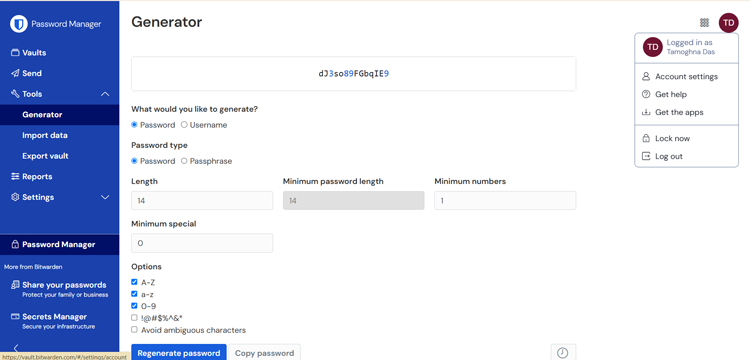
- **Password Generator:** It helps you create strong, unique passwords that are incredibly difficult to crack. Customize the length and complexity, add options for upper and lower case letters, numbers and special characters. Prefer something easier to remember? You can generate secure passphrases instead.
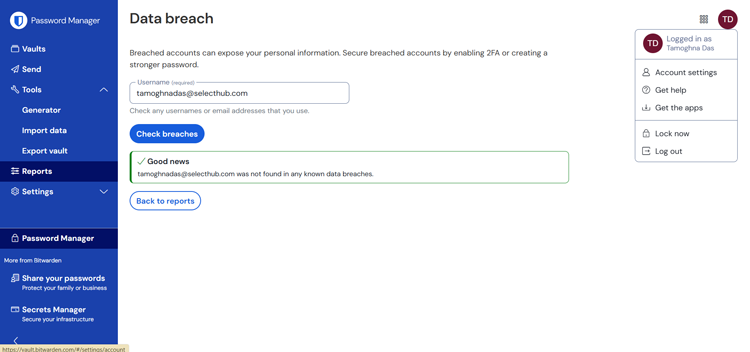
- **Reports:** Vault health reports identify exposed, reused or weak passwords, while data breach reports alert you if your information appears in known breaches. Event logs provide time-stamped records of all activity within your organization’s vault.
- **Integrations:** Bitwarden offers seamless single sign-on (SSO) integrations with SAML 2.0 and OIDC. Directory services like SCIM simplify user management and support for email alias services adds an extra layer of privacy protection.
- **Data Sharing:** End-to-end encryption lets you securely share passwords, billing credentials and business documents. You can even set automatic deletion times to remove sensitive data after a set period for added privacy.
[Read Full Review](https://www.selecthub.com/p/password-management-software/bitwarden/) [Visit Site](https://bitwarden.com/)
![Screenshots]()
[Read Full Review](https://www.selecthub.com/p/password-management-software/bitwarden/) [Visit Site](https://bitwarden.com/)

#### Why We Chose It
We chose Bitwarden for its exceptional encryption practices, including end-to-end encryption, which keeps sensitive data secure at all times. Its open-source interface and regular third-party audit features helped it earn a place in our list.
#### What Makes It Stand Out
Bitwarden stands out for its open-source nature, offering unmatched transparency and customization to fit specific needs. Its commitment to end-to-end encryption ensures data security, while regular third-party audits reinforce its reputation as a secure and reliable password manager.
#### Who It’s Best For
Bitwarden is best for organizations and individuals who prioritize open-source software and seek a secure, customizable password management solution. Its flexible deployment options — cloud-based or on-premises — make it a reliable choice for organizations with stringent security requirements.
#### Pricing
- **Teams Plan:** Priced at $3/user/month when billed annually or $4/user/month when billed monthly, this plan supports unlimited users and shared items, along with basic user management tools. The admin dashboard gives you an overview of your team’s activity, and event logs and security reports help you maintain control.
- **Enterprise Plan:** It’s priced at $5/user/month when billed annually or $6/user/month when billed monthly. This plan includes all features of the Teams plan, with additional functionalities for larger organizations. You get advanced user management with custom roles, directory sync with services like LDAP and Azure AD, [SSO integration](https://bitwarden.com/blog/easily-integrate-single-sign-on-security-with-flexible-solutions/), and API access for developers. Additionally, self-hosting is an option for maximum control over your data, and you can benefit from premium support.
Note: Bitwarden offers custom pricing plans for large enterprises with specific needs. It also provides storage add-ons if the 1GB included in the Premium plan isn’t enough. Remember, Bitwarden offers a [free 7-day trial](https://pmo.selecthub.com/free-trial/?product_name=Bitwarden&category=Password%20Management%20Software&product_logo=https://cdn.selecthub.com/products/981d50d64a8d5a7d90aa7eb49927e1b9-0c376ce6193a8e71eebad7cebf67f3cd/resources/normal/logo.png?1722585736) for its premium features, so you can try them before you buy!
#### Client Testimonials
> We’ve been using BitWarden for a few months now, and it’s quickly become a must-have tool for managing our passwords and ensuring data security. What stands out the most about BitWarden is how easy it is to use, which is really important for our team since we have members with different levels of technical expertise. The ability to store and share sensitive passwords securely across the team while keeping access streamlined has saved us time and reduced the risk of mistakes.” – Conrad Wang, Managing Director of [EnableU](https://enableu.com.au/)
> I’ve worked with Bitwarden. One thing I appreciate about Bitwarden is its zero-knowledge encryption, ensuring data is encrypted end-to-end, so even Bitwarden can’t access it. We also liked its self-hosting option, which offers full control over our data, a huge plus for privacy-focused businesses. Bitwarden is budget-friendly and scalable, but setting it up for large teams might require some extra configuration, so having in-house tech support helps.” – Rob Stevenson, Founder of [BackupLabs](https://backuplabs.io/)
[Compare Top Password Management Software Leaders](https://pmo.selecthub.com/request-custom-scorecard/?category=Password%20Management%20Software)
[](https://www.selecthub.com/p/password-management-software/keeper-enterprise/)
### [Keeper Enterprise](https://www.selecthub.com/p/password-management-software/keeper-enterprise/)
Analyst Score
Keeper Enterprise - Score: 79 out of 100 79
SelectHub analysts validated this product's capabilities through the vendor's engagement in our paid verification service. Verified products may receive a score adjustment (up to 5%, varies by category) and get priority placement in tied rankings.
Compare Compare the top leaders
Best for
Ancillary Platform FunctionsCompliance
User sentiment
94%
of users recommend this product, based on 1,085 reviews
i
Based on user reviews collected from popular reviews sites.
Start price
$2
Per User, Monthly
[Get custom pricing](https://pmo.selecthub.com/get-product-pricing/?category=Password+Management+Software&product_name=Keeper%2BEnterprise&product_logo=https%3A%2F%2Fd3uimxdj41cg3o.cloudfront.net%2Fproducts%2F01584ecac98696299889eaf9999e1b7b-088de4f6d013ceeb7ebeec09a82aefe5%2Fresources%2Fnormal%2Flogo.png%3F1722586499&price=1)
Good for
Any company size
Free trial
Yes [Request for free](https://pmo.selecthub.com/free-trial/?product_name=Keeper+Enterprise&category=Password+Management+Software&product_logo=https://cdn.selecthub.com/products/01584ecac98696299889eaf9999e1b7b-088de4f6d013ceeb7ebeec09a82aefe5/resources/normal/logo.png?1722586499)
Feature Scores
Administration and Provisioning Ancillary Platform Functions Dashboards and Reports Mobile Capabilities Multi-Factor Authentication (MFA) Password Generation and Management Remote Access Compliance Integrations and Extensibility Platform Security 92 100 92 92 95 94 60 100 72 82 0 25 50 75 100
expand scores
- Pros & Cons
- ★ Review
- Key Features
- Media
- **Strong Security:** Keeper utilizes a robust zero-knowledge encryption model, meaning your data is only accessible to you. It also offers various authentication options, including two-factor authentication and biometric login, adding extra layers of protection for your business credentials.
- **User-Friendly Interface:** Keeper is designed with ease of use in mind, featuring a clean and intuitive interface that simplifies password management for your employees. Its compatibility across multiple devices ensures a consistent experience and easy access to credentials.
- **Advanced Features for Enterprise:** Keeper offers features like privileged access management (PAM), security alerts, and secure file storage, catering to the specific needs of businesses. These features enhance security and streamline operations by providing granular control over access and data protection.
- **Reliable Support and Updates:** Keeper provides multiple support channels known for quick response times. The company also consistently rolls out regular feature updates, ensuring you have access to the latest security enhancements and improvements.
- **Limited Free Version:** The free version has very limited functionality and is only available for mobile apps.
- **High Cost for Small Teams:** Smaller teams might find the pricing to be expensive, especially if they need access to advanced features, which are not included in the basic plan.
- **Browser Extension Issues:** Some users have reported that the browser extensions can be buggy and are not very user-friendly.
- **Limited SSO Options:** Keeper offers limited single sign-on capabilities compared to other competing password management solutions.
[Read Full Review](https://www.selecthub.com/p/password-management-software/keeper-enterprise/) [Visit Site](https://www.keepersecurity.com/enterprise.html)
Is Keeper Enterprise the key to unlocking simplified security for your business? User reviews over the last year reveal a mixed bag.
While Keeper Enterprise is generally lauded for its robust security employing zero-knowledge encryption and a diverse range of authentication options, including biometric login and U2F hardware keys, it stumbles when it comes to its features and pricing, particularly for smaller teams. Users appreciate the user-friendly interface and compatibility across devices, but the limited functionality in lower-tier plans, especially compared to competitors like Dashlane and 1Password, leaves many feeling shortchanged. For instance, essential features like dark web monitoring are frustratingly relegated to a paid add-on.
A standout feature is Keeper's unique "One-Time Share" functionality, allowing secure password sharing with external parties, a boon for businesses collaborating with freelancers or contractors. However, the lack of a comprehensive free version beyond a single mobile device and the absence of a refund policy leave a bitter aftertaste for some.
Ultimately, Keeper Enterprise is best suited for larger organizations and managed service providers who can fully utilize its advanced enterprise features, including privileged access management (PAM) and robust API support for developers. Smaller businesses on a tight budget might find better value and a more comprehensive feature set elsewhere.
[Read Full Review](https://www.selecthub.com/p/password-management-software/keeper-enterprise/) [Visit Site](https://www.keepersecurity.com/enterprise.html)
- **AutoFill:** Simplify your login process with autofill capabilities. KeeperFill integrates directly into your browser’s toolbar, automatically logging you in when accessing the web vault or letting you manually log in with your email and master password. It detects login forms on websites and prompts you to fill in your credentials with just a click.
- **Password generator:** Generate strong, random passwords effortlessly. The platform lets you customize the length and character types, including uppercase and lowercase letters, numbers and symbols, so you can create secure passwords tailored to your needs.
- **Digital Vault:** Keep all your passwords, logins and personal information in one secure place. You can view and edit credentials, store important files or photos, and even import data from your web browser, other password managers or a CSV file. Sharing and managing records or folders with family, friends or colleagues is straightforward.
- **Password Sharing:** Share passwords securely with options like one-time sharing for time-limited access or vault-to-vault sharing for ongoing collaboration. You can specify permissions, like view-only or edit and revoke access anytime, ensuring total control over your shared information.
- **Passkey:** Easily create and store passkeys for secure access. When you generate a passkey on a supported website, the platform intercepts the request and saves it to your vault, making it accessible across browsers and operating systems for a seamless login experience.
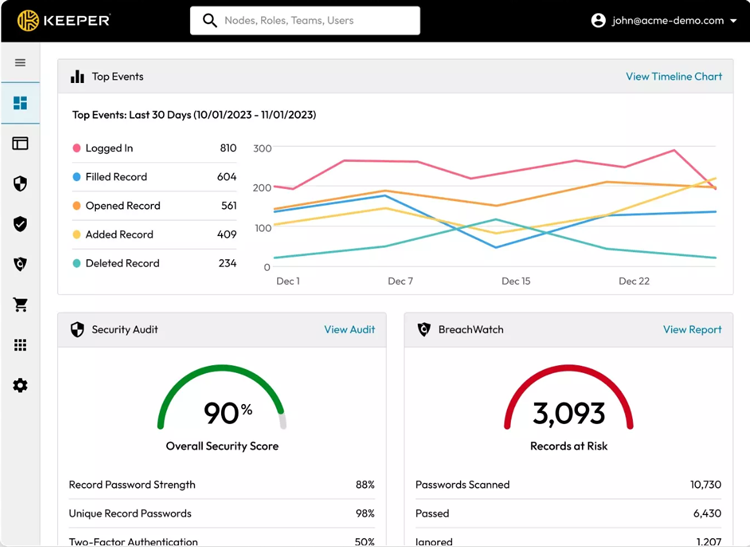
- **[BreachWatch](https://www.keepersecurity.com/breachwatch.html):** This feature scans the dark web in real time for compromised credentials and matches them against the records in your vault without exposing them. You’ll be notified if any of your passwords are at risk so you can act quickly.
[Read Full Review](https://www.selecthub.com/p/password-management-software/keeper-enterprise/) [Visit Site](https://www.keepersecurity.com/enterprise.html)
![Screenshots]()
[Read Full Review](https://www.selecthub.com/p/password-management-software/keeper-enterprise/) [Visit Site](https://www.keepersecurity.com/enterprise.html)

#### Why We Chose It
We chose Keeper Security for features like zero-knowledge encryption, real-time breach monitoring and secure handling of credentials in CI/CD pipelines. These features are essential for high-security environments.
#### What Makes It Stand Out
Keeper stands out for its Breachwatch and secrets manager tools. These tools cater to the needs of teams managing sensitive digital assets.
#### Who It’s Best For
Keeper Security is suitable for businesses of all sizes involved in development and secure access and management.
#### Pricing
- **Business Starter Plan:** It starts at $2.00 per user/month (billed annually) and includes an encrypted vault, unlimited device access and a free family plan for personal use.
- **Business Plan:** It starts around $5 per user/month (billed annually) and includes everything in the Business Starter plan.
- **Enterprise:** A [custom quote](https://www.keepersecurity.com/en_GB/pricing/business-and-enterprise.html) is available. It includes everything in the Business plan, with additional features like advanced two-factor authentication, automated team management and directory sync.
- **KeeperPAM:** A custom quote is available. It provides a customized plan based on specific features needed.
Note: You can request a [free trial](https://pmo.selecthub.com/free-trial/?product_name=Keeper%20Enterprise&category=Password%20Management%20Software&product_logo=https://cdn.selecthub.com/products/01584ecac98696299889eaf9999e1b7b-088de4f6d013ceeb7ebeec09a82aefe5/resources/normal/logo.png?1722586499) to explore their plans and choose the one that best suits your needs.
#### Client Testimonials
> In our work, we use Keeper to manage files and do administrative monitoring. It is also well-optimized for the phone, which is great for teams that work remotely or travel a lot. As a service center, I can describe Keeper as a reliable and multifunctional password manager, and it is the best choice for my company’s workflows.” – Anatolii Kasianov, CTO of [My Drama](https://my-drama.com/)
> I’ve worked with Keeper. For our team, Keeper’s emergency access and secure file storage were highly valuable, as we manage numerous sensitive documents. While it’s more feature-packed and complex than other managers, Keeper is ideal for businesses that prioritize robust security over simplicity. It’s pricier, but the focus on deep security features can be worth it if you’re handling particularly sensitive or high-stakes data.” – Rob Stevenson, Founder of [BackupLabs](https://backuplabs.io/)
[Compare Top Password Management Software Leaders](https://pmo.selecthub.com/request-custom-scorecard/?category=Password%20Management%20Software)
## FAQs
[Should a small business use a password manager?](#group_456)
Absolutely! Small businesses should use a password manager. Even if you think your business is too small to be a target, cyberattacks can happen to anyone. Password managers help secure sensitive data by storing all your passwords in one safe and encrypted place.
With features like generating strong passwords, autofilling credentials and team sharing options, it simplifies managing access while significantly reducing the risk of security breaches.
[What’s a corporate password manager?](#group_478)
A corporate password manager is another term for a business password manager. It’s designed to securely store, manage and share passwords across an organization. It provides encrypted vaults for employees, generates strong passwords and enables secure access sharing without revealing actual credentials.
[What are the different types of password managers?](#group_774)
The three main types of password managers are:
1. **Browser-Based:** These password managers are built into web browsers like Chrome or Firefox. They save and autofill passwords for websites you visit.
2. **Standalone:** These include independent apps like LastPass or Dashlane that offer advanced features like password sharing, encryption and cross-platform access.
3. **Device-Built:** Integrated into operating systems, such as iCloud Keychain for Apple devices, these password managers provide seamless password management within the same ecosystem.
[Compare Top Password Management Software Leaders](https://pmo.selecthub.com/request-custom-scorecard/?category=Password%20Management%20Software)
## Need Expert Advice? Get Personalized Recommendations
With numerous tools needed to run a business and countless digital assets to protect, writing down passwords in an Excel sheet is no longer a viable option. If protecting your digital assets is your top priority and maintaining security hygiene within your company is second, consider investing in a business password manager.
We understand that choosing the best business password manager can be daunting, especially with so many options available in the market. No worries, we’re here to help. Check out our free [comparison report](https://pmo.selecthub.com/request-custom-scorecard/?category=Password%20Management%20Software) on the top business password management tools.
Which enterprise password manager aligns with your company’s security goals? Do let us know in the comments below!
### Trending Topics
#### [Password Management](https://www.selecthub.com/research/password-management/)
[The Ultimate 1Password Review Of 2026](https://www.selecthub.com/research/1password-review/)
[Everything you need to know about 1Password, including differentiators, benefits, use cases, user reviews, pricing,…](https://www.selecthub.com/research/1password-review/)
[ Devon Hennig](https://www.selecthub.com/author/devon-hennig/) Oct 05, 2026
#### [Password Management](https://www.selecthub.com/research/password-management/)
[The 5 Best Password Manager Chrome Extensions of 2026](https://www.selecthub.com/research/password-manager-chrome-extension/)
[Choosing the right password manager can make or break your digital security infrastructure. To help…](https://www.selecthub.com/research/password-manager-chrome-extension/)
[ Tamoghna Das](https://www.selecthub.com/author/tamoghna-das/) Mar 09, 2026
Originally published in January 2025 and last updated in March 2026. Contributions from Tamoghna Das, Sagardeep Roy, Kritika Sharma, and Pooja Verma.
## About the Contributors
The following team members helped research, create, and review this content.
[![Tamoghna Das]()](https://www.selecthub.com/author/tamoghna-das/)
Written by
[Tamoghna Das](https://www.selecthub.com/author/tamoghna-das/)
Technical Content Writer
Tamoghna Das is a Technical Content Writer at SelectHub, specializing in endpoint security, warehouse management, fleet management and eCommerce. Armed with a Master's degree in Communication (Media Practice) from the University of Hyderabad, he simplifies complex tech topics into engaging content. In his downtime, Tamoghna strums his guitar, explores podcasts on aviation and astronomy, indulges in sitcoms and enjoys quality time with friends and family.
[See Full Bio](https://www.selecthub.com/author/tamoghna-das/)
[![Sagardeep Roy]()](https://www.selecthub.com/author/sagardeep-roy/)
Technical Research by
[Sagardeep Roy](https://www.selecthub.com/author/sagardeep-roy/)
Senior Analyst
Sagardeep is a Senior Research Analyst at SelectHub, specializing in diverse technical categories. His expertise spans Business Intelligence, Analytics, Big Data, ETL, Cybersecurity, artificial intelligence and machine learning, with additional proficiency in EHR and Medical Billing. Holding a Master of Technology in Data Science from Amity University, Noida, and a Bachelor of Technology in Computer Science from West Bengal University of Technology, his experience across technology, healthcare, and market research extends back to 2016. As a certified Data Science and Business Analytics professional, he approaches complex projects with a results-oriented mindset, prioritizing individual excellence and collaborative success.
[See Full Bio](https://www.selecthub.com/author/sagardeep-roy/)
[![Kritika Sharma]()](https://www.selecthub.com/author/kritika-sharma/)
Technical Research by
[Kritika Sharma](https://www.selecthub.com/author/kritika-sharma/)
Principal Analyst
Kritika currently covers software categories like ETL, Business Intelligence, EDI, Big Data Analytics, Telemedicine, Patient Engagement and Dental for SelectHub. She completed an SSC from St. Xaviers High School, Maharashtra State Board, and a diploma in Computer Engineering from Thakur College, affiliated with the Maharashtra State Board of Technical Education. She then pursued a Bachelor's in Computer Engineering from L.R. Tiwari College of Engineering and achieved 3rd position in her college for academic performance. During her academic years, she actively participated in project exhibitions, extempore competitions, techno fests, debates, group discussions, and. Outside the technical sphere, she enjoys exploring, cooking and engaging in social activities.
[See Full Bio](https://www.selecthub.com/author/kritika-sharma/)
[![Pooja Verma]()](https://www.selecthub.com/author/pooja-verma/)
Edited by
[Pooja Verma](https://www.selecthub.com/author/pooja-verma/)
Content Editor
Pooja Verma is a Content Editor and Technical Content Writer at SelectHub. She has over 5 years of experience covering software categories like CRM, marketing automation, supply chain management and endpoint security. Pooja earned a literature degree from Miranda House, DU and also holds a Master’s in Journalism from Symbiosis Institute of Media and Communication in India.
[See Full Bio](https://www.selecthub.com/author/pooja-verma/)
Tamoghna DasThe 5 Best Password Manager Chrome Extensions of 2026
- ‹
- ›
### Conversation
 Write a response
[Cancel reply](https://www.selecthub.com/research/enterprise-password-management-software/#respond)
Your message
Your name \*
Your email \*
Website
Save my name, email, and website in this browser for the next time I comment.
Compare
**Tier 1:**
Fully/moderately supported out-of-the-box allowing for quick and easy deployment.
Fully or moderately supported out-of-the-box with industry-leading capabilities and is immediately available after installation without needing any add-ons, integrations, or custom development.
**Tier 2:**
Supported with workarounds or add-ons that may require additional costs.
Not directly available in the software, but can be accomplished using other built-in features, workarounds, or add-ons/products from the vendor with or without any additional cost.
**Tier 3:**
Requires partner integrations or custom development that is often at an additional cost.
Requires additional integrations, plugins, marketplace applications from a third-party vendor, or custom development using the APIs, libraries, extensions, and development framework supported by the software, with or without any additional cost.
Close
```json
{"@context":"https:\/\/schema.org","@graph":[{"@type":"Article","@id":"https:\/\/www.selecthub.com\/research\/enterprise-password-management-software\/#article","isPartOf":{"@id":"https:\/\/www.selecthub.com\/research\/enterprise-password-management-software\/"},"author":{"name":"Tamoghna Das","@id":"https:\/\/www.selecthub.com\/#\/schema\/person\/7aaf4180aa03dfbba5291b2a079b1014"},"headline":"The 5 Best Business Password Managers for 2026","datePublished":"2025-01-15T15:10:23+00:00","dateModified":"2026-03-09T13:50:30+00:00","mainEntityOfPage":{"@id":"https:\/\/www.selecthub.com\/research\/enterprise-password-management-software\/"},"wordCount":4647,"commentCount":0,"publisher":{"@id":"https:\/\/www.selecthub.com\/#organization"},"articleSection":["Password Management"],"inLanguage":"en-US","potentialAction":[{"@type":"CommentAction","name":"Comment","target":["https:\/\/www.selecthub.com\/research\/enterprise-password-management-software\/#respond"]}]},{"@type":"WebPage","@id":"https:\/\/www.selecthub.com\/research\/enterprise-password-management-software\/","url":"https:\/\/www.selecthub.com\/research\/enterprise-password-management-software\/","name":"Best Business Password Managers for 2026","isPartOf":{"@id":"https:\/\/www.selecthub.com\/#website"},"datePublished":"2025-01-15T15:10:23+00:00","dateModified":"2026-03-09T13:50:30+00:00","breadcrumb":{"@id":"https:\/\/www.selecthub.com\/research\/enterprise-password-management-software\/#breadcrumb"},"inLanguage":"en-US","potentialAction":[{"@type":"ReadAction","target":["https:\/\/www.selecthub.com\/research\/enterprise-password-management-software\/"]}]},{"@type":"BreadcrumbList","@id":"https:\/\/www.selecthub.com\/research\/enterprise-password-management-software\/#breadcrumb","itemListElement":[{"@type":"ListItem","position":1,"name":"Home","item":"https:\/\/www.selecthub.com\/"},{"@type":"ListItem","position":2,"name":"Password Management","item":"https:\/\/www.selecthub.com\/research\/password-management\/"},{"@type":"ListItem","position":3,"name":"The 5 Best Business Password Managers for 2026"}]},{"@type":"WebSite","@id":"https:\/\/www.selecthub.com\/#website","url":"https:\/\/www.selecthub.com\/","name":"SelectHub","description":"Confidence in Software","publisher":{"@id":"https:\/\/www.selecthub.com\/#organization"},"potentialAction":[{"@type":"SearchAction","target":{"@type":"EntryPoint","urlTemplate":"https:\/\/www.selecthub.com\/?s={search_term_string}"},"query-input":{"@type":"PropertyValueSpecification","valueRequired":true,"valueName":"search_term_string"}}],"inLanguage":"en-US"},{"@type":"Organization","@id":"https:\/\/www.selecthub.com\/#organization","name":"SelectHub","url":"https:\/\/www.selecthub.com\/","logo":{"@type":"ImageObject","inLanguage":"en-US","@id":"https:\/\/www.selecthub.com\/#\/schema\/logo\/image\/","url":"","contentUrl":"","caption":"SelectHub"},"image":{"@id":"https:\/\/www.selecthub.com\/#\/schema\/logo\/image\/"},"sameAs":["https:\/\/www.facebook.com\/selecthub\/","https:\/\/x.com\/SelectHub","https:\/\/www.linkedin.com\/company\/selecthub"]},{"@type":"Person","@id":"https:\/\/www.selecthub.com\/#\/schema\/person\/7aaf4180aa03dfbba5291b2a079b1014","name":"Tamoghna Das","image":{"@type":"ImageObject","inLanguage":"en-US","@id":"https:\/\/www.selecthub.com\/wp-content\/uploads\/2022\/08\/Tamoghna-Headshot-96x96.jpg","url":"https:\/\/www.selecthub.com\/wp-content\/uploads\/2022\/08\/Tamoghna-Headshot-96x96.jpg","contentUrl":"https:\/\/www.selecthub.com\/wp-content\/uploads\/2022\/08\/Tamoghna-Headshot-96x96.jpg","caption":"Tamoghna Das"},"description":"Tamoghna Das is a Technical Content Writer at SelectHub, specializing in endpoint security, warehouse management, fleet management and eCommerce. Armed with a Master's degree in Communication (Media Practice) from the University of Hyderabad, he simplifies complex tech topics into engaging content. In his downtime, Tamoghna strums his guitar, explores podcasts on aviation and astronomy, indulges in sitcoms and enjoys quality time with friends and family.","sameAs":["https:\/\/www.selecthub.com","https:\/\/www.linkedin.com\/in\/tamoghna-das-753103180\/"],"url":"https:\/\/www.selecthub.com\/author\/tamoghna-das\/"}]}
{"@context":"https://schema.org","@type":"FAQPage","mainEntity":[{"@type":"Question","name":"Should a small business use a password manager?","acceptedAnswer":{"@type":"Answer","text":"Absolutely! Small businesses should use a password manager. Even if you think your business is too small to be a target, cyberattacks can happen to anyone. Password managers help secure sensitive data by storing all your passwords in one safe and encrypted place.\nWith features like generating strong passwords, autofilling credentials and team sharing options, it simplifies managing access while significantly reducing the risk of security breaches."}},{"@type":"Question","name":"What’s a corporate password manager?","acceptedAnswer":{"@type":"Answer","text":"A corporate password manager is another term for a business password manager. It’s designed to securely store, manage and share passwords across an organization. It provides encrypted vaults for employees, generates strong passwords and enables secure access sharing without revealing actual credentials."}},{"@type":"Question","name":"What are the different types of password managers?","acceptedAnswer":{"@type":"Answer","text":"The three main types of password managers are:\n\nBrowser-Based: These password managers are built into web browsers like Chrome or Firefox. They save and autofill passwords for websites you visit.\nStandalone: These include independent apps like LastPass or Dashlane that offer advanced features like password sharing, encryption and cross-platform access.\nDevice-Built: Integrated into operating systems, such as iCloud Keychain for Apple devices, these password managers provide seamless password management within the same ecosystem."}}]}
{
"@context": "https://schema.org",
"@type": "Article",
"headline": "The 5 Best Business Password Managers for 2026",
"author":{
"@type": "Person",
"name": "Tamoghna Das",
"url": "https://www.selecthub.com/author/tamoghna-das/",
"jobTitle":"Technical Content Writer",
"image": "https://www.selecthub.com/wp-content/uploads/2022/08/Tamoghna-Headshot-96x96.jpg"
},
"publisher":{
"@type": "Organization",
"name": "SelectHub",
"logo": {
"@type":"ImageObject",
"url": "https://www.selecthub.com/wp-content/uploads/2019/10/favicon.png"
}
},
"datePublished": "2025-01-15T08:10:23-07:00",
"dateModified": "2026-03-09T07:50:30-06:00",
"mainEntityOfPage": "https://www.selecthub.com/research/enterprise-password-management-software/"
}
```