---
description: Is Bigin the right solution for you? See where it's ranked among all CRM Software. Read expert reviews, compare 2026 pricing, and explore top-rated features.
---
[Home](https://www.selecthub.com/) > [CRM](https://www.selecthub.com/category/customer-relationship-management/) > [CRM Software](https://www.selecthub.com/c/crm-software/) > Bigin
Categories:
- [CRM Software](https://www.selecthub.com/c/crm-software/)
- ...
## What Is Bigin?
**Industry Specialties:** Serves all industries
Bigin is a pipeline-focused CRM that helps manage sales pipelines efficiently with features like team pipelines, sub-pipelines, custom forms and multi-channel communication. Developed by Zoho, it offers a lightweight alternative to more complex systems, focusing on ease of use, essential functionality and affordability.
Ideal for businesses with limited technical resources, Bigin provides a user-friendly interface that allows teams to quickly set up and manage leads, track communications and automate routine tasks. The platform integrates seamlessly with the Zoho ecosystem. Key features include built-in telephony, email tracking, form creation and customizable dashboards.
While Bigin offers significant value, it comes with some limitations. The platform is best for businesses with straightforward CRM needs, as it may lack advanced features. Users appreciate its intuitive design and responsive customer support but have noted concerns about high pricing, limited third-party integrations and some feature constraints. Limitations include restricted document uploads, basic reporting tools and IMAP restrictions that limit users to one email account each.
Pricing is competitive, with a free plan available for a single user managing one pipeline — making it an attractive option for solo entrepreneurs. Paid plans offer additional features and support for multiple users and pipelines, with pricing scaling based on the number of users and required functionality.
**Our Research Process for Bigin**
My research on Bigin began by signing up for a free trial. To supplement my personal experience, I also studied user reviews on G2, gaining opinions from real-world users about their challenges and successes with the platform. I went a step further by conducting interviews with actual Bigin users and listening to their firsthand accounts of how the CRM fits into their business workflows.
I also consulted reports from SelectHub analysts to validate my findings and understand the broader market context. To ensure a complete picture, I watched numerous product videos and tutorials, which helped me discover features I might have missed during my trial. As a final step of validation, I installed the Android app and tested its mobile functionality, ensuring I could assess the platform's performance across different usage scenarios.
PRICE
$
$
$
$
$
COMPANY SIZE
S
M
L
DEPLOYMENT
PLATFORM
[Try Before You Buy. Request a Free Demo Today!Request Demo It's completely free!](https://pmo.selecthub.com/get-product-demo/?category=CRM+Software&product_name=Bigin&origin_url=https%3A%2F%2Fwww.selecthub.com%2Fp%2Fcrm-software%2Fbigin%2F&product_logo=https%3A%2F%2Fcdn.selecthub.com%2Fproducts%2F908075ea2c025c335f4865f7db427062-2b5307d131d799d0248518879cfee976%2Fresources%2Fnormal%2Flogo.png%3F1736238918)
[Contributors](#view-contributors)
![Anjali Krishna]() Written by Anjali Krishna Technical Content Writer [Read Bio](https://www.selecthub.com/author/anjali-krishna/)
![Pooja Verma]() Edited by Pooja Verma Content Editor [Read Bio](https://www.selecthub.com/author/pooja-verma/)
User Sentiment i
![User satisfaction level icon: excellent]()
Based on 1221 reviews:
Add your rating:
![Screenshots]()![Screenshots]()
Product Screenshots and Videos
## #80
Bigin is ranked #80 in the CRM Software product directory based on the latest available data collected by SelectHub. Compare the leaders with our In-Depth Report.
[Get the Report Now](https://pmo.selecthub.com/top-crm-analyst-report-site-vers?category_slug=crm-software&product_slug=bigin&page_type=product&slug=bigin&product_name=Bigin&category=CRM+Software&origin_url=https%3A%2F%2Fwww.selecthub.com%2Fp%2Fcrm-software%2Fbigin%2F)
## Bigin Pricing
Based on our most recent analysis, Bigin pricing starts at $5 (Per User, Monthly).
[Get Price Quote](https://pmo.selecthub.com/get-product-pricing/?category=CRM+Software&product_name=Bigin&origin_url=https%3A%2F%2Fwww.selecthub.com%2Fp%2Fcrm-software%2Fbigin%2F&product_logo=https%3A%2F%2Fcdn.selecthub.com%2Fproducts%2F908075ea2c025c335f4865f7db427062-2b5307d131d799d0248518879cfee976%2Fresources%2Fnormal%2Flogo.png%3F1736238918&price=1)
- Price
-
$
$
$
$
$
i
- Starting From
- $4.67
- Pricing Model
- Per User, Monthly
- Free Trial
- Yes - Request for Free
## Training Resources
Bigin is supported with the following types of training:
- Documentation
- In Person
- Live Online
- Videos
- Webinars
## Support
The following support services are available for Bigin:
- Email
- Phone
- Chat
- FAQ
- Forum
- Help Desk
- Knowledge Base
- Tickets
- Training
- 24/7 Live Support
## Bigin Benefits and Insights
Why use Bigin?
### Key differentiators & advantages of Bigin
- **Streamline Record Management:** Bigin simplifies record tracking by offering a connected records feature that provides a complete view of a record's entire lifecycle across different team pipelines. You can automatically create connected records via workflows, ensuring seamless transitions between different stages of business activities.
- **Maintain Data Integrity and Accuracy:** Take control of your data quality with Bigin's stage transition rules that mandate specific field completions before moving records between stages. You can create up to 30 transition rules per pipeline, with each rule allowing you to specify up to five fields that you must fill during stage transitions. This helps you maintain consistent record management.
- **Simplify Communication With Email-in Tracking:** Improve your email management with Bigin's email-in feature that automatically converts team emails into organized records within your pipeline. Whether the email comes from an existing contact or a new sender, the system automatically creates and links records to keep your team informed and responsive.
- **Improve File Sharing Security:** Protect your file transfers with Bigin's file cabinet feature, which generates unique, OTP-authenticated links for file uploads. You can easily send file upload links to customers as they progress through your sales pipeline.
- **Optimize Billing:** Streamline your billing process by integrating with Zoho Invoice, allowing you to create professional invoices and estimates at no additional cost. You can customize invoice templates, add your company logo and track transaction histories effortlessly.
### Industry Expertise
Bigin is best suited for small and medium-sized sales-driven organizations, including those in real estate, consulting, IT services and other sectors that require efficient lead management and sales pipeline tracking.
## Bigin Reviews
Based on our most recent analysis, Bigin reviews indicate a 'excellent' User Satisfaction Rating of 92% based on 1221 user reviews from 3 recognized software review sites.
![User satisfaction level icon: excellent]()
1221 reviews
92%
of users would recommend this product
### Synopsis of User Ratings and Reviews
Based on an aggregate of Bigin reviews taken from the sources above, the following pros & cons have been curated by a SelectHub Market Analyst.
#### Pros
- **Easy To Use:** Bigin offers a user-friendly design that makes navigating CRM straightforward for teams of all technical skill levels.
- **Affordable Solution:** You get a robust CRM platform at a budget-friendly price point, making it an excellent choice for small businesses and startups.
- **Responsive Customer Support:** Bigin provides reliable customer support that helps you quickly resolve issues and get the most out of your CRM experience.
#### Cons
- **Limited Integration Options:** The CRM has a relatively narrow range of integrations compared to more comprehensive CRM platforms.
- **Basic Feature Set:** Bigin lacks some advanced features, like document management and advanced reporting, which are found in more expensive CRM solutions. This might leave growing businesses wanting more functionality as they scale.
#### Researcher's Summary:
A few days into my Bigin free trial, I concluded that they definitely have responsive customer service. A support representative reached out, offering personalized guidance for my initial platform exploration. But I wanted to try Bigin for myself and see what it could do.
The first thing I noticed about the CRM was its simplicity. It's clearly designed for small businesses and startups looking for an uncomplicated solution. Its user-friendly interface made learning the system relatively smooth, though I did encounter a few minor bugs during the integration processes.
The platform's strength definitely lies in its seamless integration with the Zoho ecosystem, which can be an advantage for businesses already using Zoho products. While I appreciate the ability to create custom workflows, I wish there were more ready-made templates to speed up the initial setup.
Bigin's dual functionality as a CRM and helpdesk tool can be incredibly valuable for small teams looking to consolidate their customer management tools. Yet, the pricing structure feels a bit steep for small businesses, especially when some of the most useful features are locked behind the premier version.
The IMAP limitation of one account per user seemed archaic. The lack of a straightforward document upload feature within the platform felt like a missed opportunity for record-keeping. Also, I had to constantly refresh to see real-time data.
The reporting tools, while easy to use, lack depth for more complex analysis. Combined with limited third-party integrations and a feature set that might feel restrictive as a business grows, Bigin is best suited for very small companies or those just starting their CRM journey.
Dharshini Suriya, a Talent Acquisition Specialist and active Bigin user, said:
> I appreciate Bigin for its affordability, making it a deal for startups. My favorite part is that it integrates with social media platforms, making my work easier.
> However, it might not be scalable for businesses with growing demands. Zoho's scalability is constrained by its bootstrapped growth model, enterprise competition and the challenge of balancing product breadth with depth.”
Despite its limitations, Bigin offers a solid entry-level CRM experience. Its fast loading times and essential customization options make it an attractive option. However, companies with complex needs or anticipating rapid growth may need to migrate to a more feature-rich solution in the future.
## Key Features
- **Pipeline Management:** Team pipelines unify all customer-facing operations like marketing, sales, onboarding, delivery and support within a single account. You can set up multiple sub-pipelines within each main pipeline, customize record and field names and define stages.
- **Workflow Automation:** You can create triggers and actions to streamline your business processes automatically. Set up workflows to send welcome emails, create deal alerts, modify field values, assign leads and even schedule these workflows to repeat monthly, yearly or at specific times.
- **Form Creation:** The forms feature offers a user-friendly drag-and-drop interface that allows you to build custom forms. You can embed these forms on your website, share them across multiple channels via a unique QR code or link and automatically create contact records at the appropriate pipeline stage.
- **Multi-channel Communication:** Bigin allows you to interact with customers through calls, emails, WhatsApp, Twitter and virtual platforms like Zoho Meeting, Microsoft Teams and Zoom. With support for IMAP and POP3 email protocols and a Gmail add-on, you can easily capture and link all communications to corresponding contact records.
- **Templates:** The developer console lets you create and manage email and inventory templates for quick sharing with multiple customers. You can also set up workflow rules to automatically send pre-formatted emails on meeting specific conditions.
- **Built-in Telephony:** This feature enables you to make and receive calls directly within the platform, with all calls automatically logged in the activities module. You can purchase local and toll-free numbers, configure personalized voice recordings, set up IVR menus, and enjoy features like automatic call mapping to contacts and deals.
- **Mobile App:** Bigin provides a native mobile app for both Android and iOS devices. It lets you manage deal pipelines and contacts, add tasks and schedule events, ensuring you stay productive regardless of your location.
- **Dashboard and Analytics:** The platform provides three pre-built dashboards for call and email metrics, along with the ability to create custom ones to monitor your specific business processes. You can create charts and KPIs, set individual and team goals, and visualize your performance using visual representations like dial gauges, traffic lights and bar charts.
## See It In Action: Creating a Custom Workflow With Bigin
I'm going to walk you through how I created an automated workflow in Bigin that simplifies lead management. Here's how I set it up step by step:
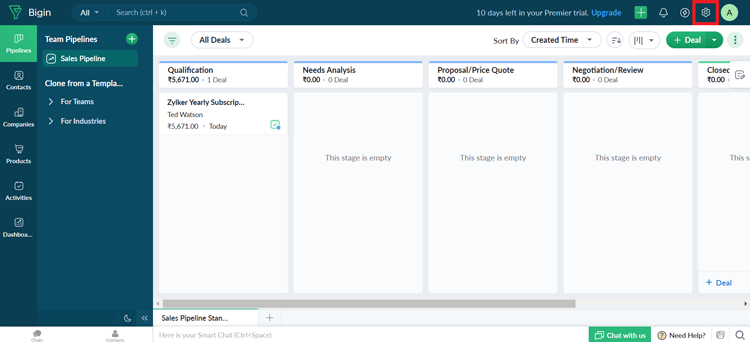
First, I navigated to the home page and clicked on the **Settings** menu. This is where all the customization happens.
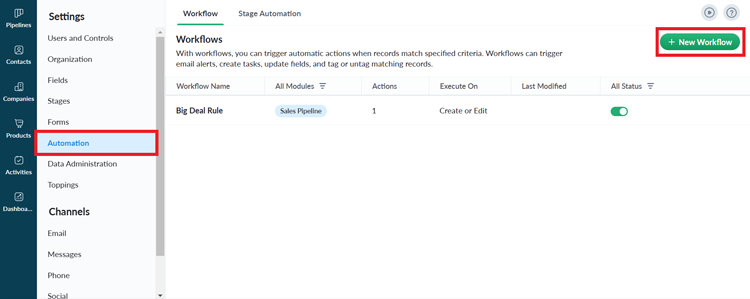
In **Settings**, I clicked on the **Automation** tab and selected **New Workflow**.
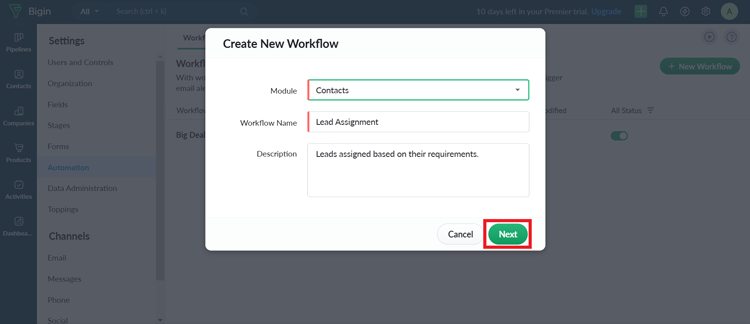
I created a workflow specifically for lead assignments. I selected the **Contacts** module, named the workflow "Lead Assignment," and added a brief description to help my team understand its purpose. With all the details filled in, I clicked **Next** to move forward.
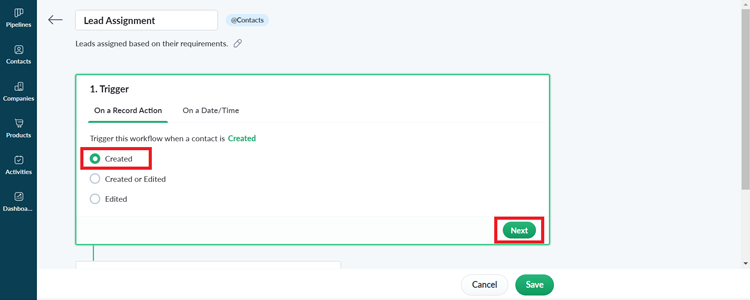
Setting up the workflow requires three key components: **Trigger, Condition** and **Action**. Think of these as the workflow's DNA. The trigger determines when the workflow starts (in this case, when a new lead is created), the condition specifies which records will be affected, and the action defines what happens when those conditions are met.
Imagine I'm running an electronics business and want to ensure that leads specifically looking for laptops are routed to the right team member.
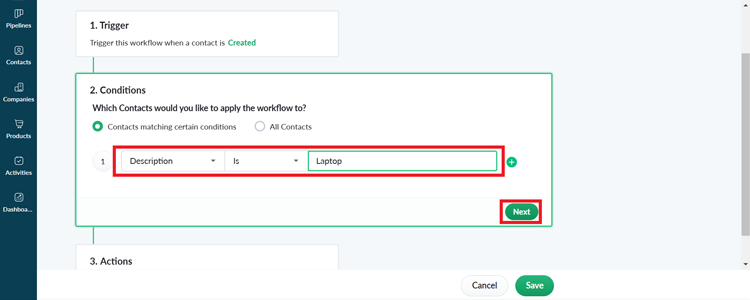
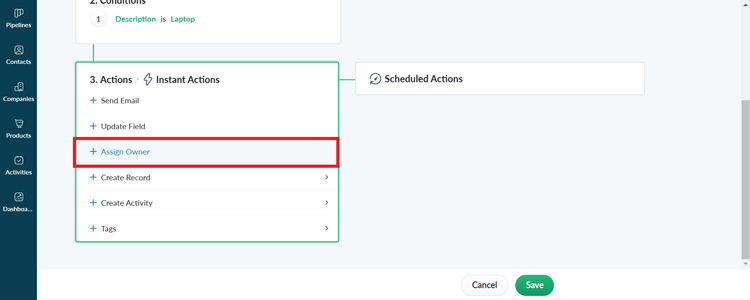
I used the **Assign Owner** action, selecting the team member who specializes in laptop sales. This ensured that every laptop-related lead gets immediate, expert attention.

After confirming all the details, I saved the workflow. Now, every time a new lead comes in with a laptop requirement, Bigin will automatically assign it to the designated salesperson.
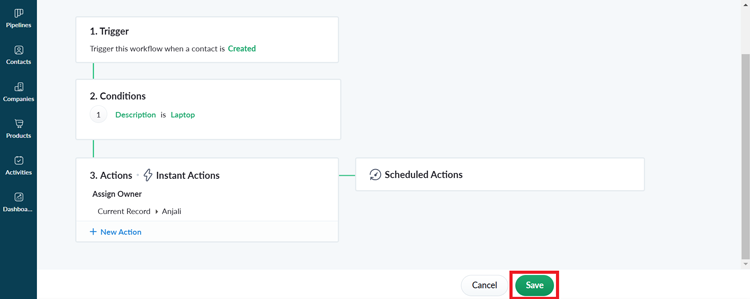

This workflow eliminates manual lead sorting and ensures that specialized leads reach the right team member instantly. The process seemed intimidating at first, but Bigin's interface made setting up the workflow surprisingly straightforward. Sure, it took me a few minutes to configure, but the potential savings in time and increased likelihood of converting leads make it absolutely worth the effort for salespeople.
## Limitations
At the time of this review, these are the limitations according to user feedback:
- You can only have one profile and role and can import a maximum of 250 records at a time.
- You’ll need to find alternative solutions to back up your data and store files.
- Bigin only supports exporting data up to 10 times per day.
- You can't access the mobile app when you’re offline.
![Banner of Pricing guide for Bigin]()
## Pricing & Cost Details
See the Price/User for the top CRM software… plus the most important considerations and questions to ask when shopping.
See Pricing Details
## Awards
Bigin stands above the rest by achieving an ‘Excellent’ rating as a User Favorite.

## Pricing for CRM Software
![Banner of Pricing guide for CRM Software]()
## Similar Products
Here are the most similar products to Bigin.
[![Skyward CRM product logo]() Skyward CRM](https://www.selecthub.com/p/crm-software/skyward-crm/)
[![monday sales CRM product logo]() monday sales CRM](https://www.selecthub.com/p/crm-software/monday-sales-crm/)
[![SalezShark product logo]() SalezShark](https://www.selecthub.com/p/crm-software/salezshark/)
[![TeleCRM product logo]() TeleCRM](https://www.selecthub.com/p/crm-software/telecrm/)
[![openCRX product logo]() openCRX](https://www.selecthub.com/p/crm-software/opencrx/)
[![karmaCRM product logo]() karmaCRM](https://www.selecthub.com/p/crm-software/karmacrm/)
[![GroupOffice product logo]() GroupOffice](https://www.selecthub.com/p/crm-software/groupoffice/)
[![Revamp CRM product logo]() Revamp CRM](https://www.selecthub.com/p/crm-software/revamp-crm/)
[![eWards product logo]() eWards](https://www.selecthub.com/p/crm-software/ewards/)
[![YetiForce product logo]() YetiForce](https://www.selecthub.com/p/crm-software/yetiforce/)
## About the Contributors
The following expert team members are responsible for creating, reviewing, and fact checking the accuracy of this content.
[![Anjali Krishna]()](https://www.selecthub.com/author/anjali-krishna/)
Written by
[Anjali Krishna](https://www.selecthub.com/author/anjali-krishna/)
Technical Content Writer
Anjali is a former Technical Content Writer at SelectHub who specialized in software categories including CRM, fundraising, and sales force automation. Drawing on her IT engineering background and 5 years of experience as a writer helped her translate technical topics into engaging content to educate software buyers.
[See Full Bio](https://www.selecthub.com/author/anjali-krishna/)
[![Pooja Verma]()](https://www.selecthub.com/author/pooja-verma/)
Edited by
[Pooja Verma](https://www.selecthub.com/author/pooja-verma/)
Content Editor
Pooja Verma is a Content Editor and Technical Content Writer at SelectHub. She has over 5 years of experience covering software categories like CRM, marketing automation, supply chain management and endpoint security. Pooja earned a literature degree from Miranda House, DU and also holds a Master’s in Journalism from Symbiosis Institute of Media and Communication in India.
[See Full Bio](https://www.selecthub.com/author/pooja-verma/)
Your review has been submitted
and should be visible within 24 hours.
Review Title
Pros
Cons
Overall feedback
Your name
Your job title
Industry
Choose your main industry
- Accounting / CPA
- Advertising
- Aerospace & Defense
- Agriculture
- Apparel
- Architecture
- Auto Dealership
- Automotive
- Banking & Financial Services
- Banking & Mortgage
- Chemicals
- Construction & Engineering
- Construction / Contracting
- Consulting
- Consumer Products
- Distribution
- E-commerce
- Education
- Electronics
- Energy & Utilities
- Federal Government
- Field Maintenance
- Food & Beverage
- Healthcare / Social Services
- Hospitality / Gaming / Travel
- Human Resources
- Industrial Machinery
- Information Technology & High Tech
- Insurance
- Legal
- Maintenance / Field Service
- Manufacturing
- Marketing Services
- Media & Communications / Entertainment
- Mill Products
- Mining / Metals
- Mortgage
- Non-Profit
- Not Available
- Oil & Gas
- Other
- Other Services
- Payroll Provider
- Pharmaceuticals
- Professional Employer Organization
- Professional Services
- Property Management
- Public Sector
- Real Estate
- Recruiting Agency
- Religious Institutions
- Retail
- Sales & Marketing
- Semiconductors
- Software / IT
- Sports and Recreation
- Staffing Agency
- State & Local Government
- Telecommunications
- Third-Party Administrator
- Transportation & Logistics
- Wholesale Distribution
Company Size
Choose your company size
- 1 employee
- 2 to 9 employees
- 10 - 19 employees
- 20 - 49 employees
- 50 - 99 employees
- 100 - 499 employee
- 500 - 999 employees
- 1,000 - 2,499 employees
- 2,500 - 4,999 employees
- 5,000 - 9,999 employees
- 10,000 - 24,999 employees
- 25,000 - 49,999 employees
- 50,000 + employees
```json
{
"@context": "https://schema.org",
"@type": "BreadcrumbList",
"itemListElement": [
{
"@type": "ListItem",
"position": 1,
"name": "Home",
"item": "https://www.selecthub.com/"
},
{
"@type": "ListItem",
"position": 2,
"name": "CRM",
"item": "https://www.selecthub.com/category/customer-relationship-management/"
},
{
"@type": "ListItem",
"position": 3,
"name": "CRM Software",
"item": "https://www.selecthub.com/c/crm-software/"
},
{
"@type": "ListItem",
"position": 4,
"name": "Bigin"
}
]
}
{
"@context": "http://schema.org",
"@type": "SoftwareApplication",
"name": "Bigin",
"description": "Bigin is a pipeline-focused CRM that helps manage sales pipelines efficiently with features like team pipelines, sub-pipelines, custom forms and multi-channel communication. Developed by Zoho, it offers a lightweight alternative to more complex systems, focusing on ease of use, essential functionality and affordability.Ideal for businesses with limited technical resources, Bigin provides a user-friendly interface that allows teams to quickly set up and manage leads, track communications and automate routine tasks. The platform integrates seamlessly with the Zoho ecosystem. Key features include built-in telephony, email tracking, form creation and customizable dashboards.While Bigin offers significant value, it comes with some limitations. The platform is best for businesses with straightforward CRM needs, as it may lack advanced features. Users appreciate its intuitive design and responsive customer support but have noted concerns about high pricing, limited third-party integrations and some feature constraints. Limitations include restricted document uploads, basic reporting tools and IMAP restrictions that limit users to one email account each.Pricing is competitive, with a free plan available for a single user managing one pipeline — making it an attractive option for solo entrepreneurs. Paid plans offer additional features and support for multiple users and pipelines, with pricing scaling based on the number of users and required functionality.Our Research Process for BiginMy research on Bigin began by signing up for a free trial. To supplement my personal experience, I also studied user reviews on G2, gaining opinions from real-world users about their challenges and successes with the platform. I went a step further by conducting interviews with actual Bigin users and listening to their firsthand accounts of how the CRM fits into their business workflows.I also consulted reports from SelectHub analysts to validate my findings and understand the broader market context. To ensure a complete picture, I watched numerous product videos and tutorials, which helped me discover features I might have missed during my trial. As a final step of validation, I installed the Android app and tested its mobile functionality, ensuring I could assess the platform's performance across different usage scenarios.",
"review": {
"@type": "Review",
"author": {
"@type": "Person",
"name": "Anjali Krishna",
"reviewBody": "A few days into my Bigin free trial, I concluded that they definitely have responsive customer service. A support representative reached out, offering personalized guidance for my initial platform exploration. But I wanted to try Bigin for myself and see what it could do.The first thing I noticed about the CRM was its simplicity. It's clearly designed for small businesses and startups looking for an uncomplicated solution. Its user-friendly interface made learning the system relatively smooth, though I did encounter a few minor bugs during the integration processes.The platform's strength definitely lies in its seamless integration with the Zoho ecosystem, which can be an advantage for businesses already using Zoho products. While I appreciate the ability to create custom workflows, I wish there were more ready-made templates to speed up the initial setup. Bigin's dual functionality as a CRM and helpdesk tool can be incredibly valuable for small teams looking to consolidate their customer management tools. Yet, the pricing structure feels a bit steep for small businesses, especially when some of the most useful features are locked behind the premier version.The IMAP limitation of one account per user seemed archaic. The lack of a straightforward document upload feature within the platform felt like a missed opportunity for record-keeping. Also, I had to constantly refresh to see real-time data.The reporting tools, while easy to use, lack depth for more complex analysis. Combined with limited third-party integrations and a feature set that might feel restrictive as a business grows, Bigin is best suited for very small companies or those just starting their CRM journey.Dharshini Suriya, a Talent Acquisition Specialist and active Bigin user, said:I appreciate Bigin for its affordability, making it a deal for startups. My favorite part is that it integrates with social media platforms, making my work easier.However, it might not be scalable for businesses with growing demands. Zoho's scalability is constrained by its bootstrapped growth model, enterprise competition and the challenge of balancing product breadth with depth.”Despite its limitations, Bigin offers a solid entry-level CRM experience. Its fast loading times and essential customization options make it an attractive option. However, companies with complex needs or anticipating rapid growth may need to migrate to a more feature-rich solution in the future."
}
},
"image": "https://cdn.selecthub.com/products/908075ea2c025c335f4865f7db427062-2b5307d131d799d0248518879cfee976/resources/normal/logo.png?1736238918",
"aggregateRating": {
"@type": "AggregateRating",
"ratingValue": "92",
"bestRating": "100",
"worstRating": "1",
"ratingCount": "1221"
},
"offers": {
"@type": "Offer",
"priceSpecification": {
"@type": "priceSpecification",
"price": "4.67",
"priceCurrency": "USD"
}
},
"positiveNotes": {
"@type": "ItemList",
"itemListElement": [
{
"@type": "ListItem",
"position": 1,
"name": "Easy To Use: Bigin offers a user-friendly design that makes navigating CRM straightforward for teams of all technical skill levels."
},
{
"@type": "ListItem",
"position": 2,
"name": "Affordable Solution: You get a robust CRM platform at a budget-friendly price point, making it an excellent choice for small businesses and startups."
},
{
"@type": "ListItem",
"position": 3,
"name": "Responsive Customer Support: Bigin provides reliable customer support that helps you quickly resolve issues and get the most out of your CRM experience."
}
]
},
"negativeNotes": {
"@type": "ItemList",
"itemListElement": [
{
"@type": "ListItem",
"position": 1,
"name": "Limited Integration Options: The CRM has a relatively narrow range of integrations compared to more comprehensive CRM platforms."
},
{
"@type": "ListItem",
"position": 2,
"name": "Basic Feature Set: Bigin lacks some advanced features, like document management and advanced reporting, which are found in more expensive CRM solutions. This might leave growing businesses wanting more functionality as they scale."
},
{
"@type": "ListItem",
"position": 3,
"name": ""
}
]
},
"applicationCategory": "CRM Software"
}
```
